How to Personalise Customer Service Emails Without Slowing Down
Published 20 September 2026 · 9 minute read · The ReciteMail Blog
Every support desk reaches the same point. The inbox grows and you write saved replies. The saved replies make you fast. Then a customer writes back "did anyone actually read my email?" and you realise the speed had a price. The usual advice is to personalise more, which sounds like going back to writing every reply from scratch. It is not. A reply feels personal because of three small things. None of them takes more than a few seconds. This guide covers what they are, how to add them to any saved reply and when to stop using the saved reply at all.
Why a saved reply feels robotic
A macro is written to answer a category of email: late delivery, refund request, password reset. The customer did not send a category. They sent one email about one order, with their own words for what went wrong and usually one detail that matters to them more than it matters to you. The saved reply answers the category correctly and ignores everything that made the email theirs. That gap is what reads as robotic. The wording can be warm and the reply can still fail, because warmth was never the problem.
Macros also age. The one written in March mentions a courier you stopped using in June. The returns window changed and two of the five saved replies still show the old one. Customers do not know any of that. They just notice that the reply is slightly off and draw the obvious conclusion: nobody looked.

The three things customers check for
Nobody reads a support reply carefully. They scan it for evidence that a person read theirs. There are three kinds of evidence and one of each is enough.
- Their own words, echoed back. If they wrote "the zip broke on the second wear", the reply that says "sorry the zip broke on the second wear" has been read. The reply that says "sorry to hear you are experiencing an issue with your item" has been filed. Use their phrase, once, in the first line.
- A detail only their order has. The product by name, the delivery city, the date they ordered, the fact that it was a gift. One detail. It proves you opened the order and it stops the customer wondering whether you are replying to the right person.
- A sentence no template would contain. "The navy one is my favourite too." "Good luck with the move." "Twelve years, thank you for sticking with us." It is short, specific to them and true. It costs four seconds. It is the only line in the email they will repeat to someone else.
The 20 second personal layer
Keep your saved replies. They are good at what they do: the policy, the steps and the timings, stated the same way every time. What changes is that the saved reply is no longer the whole email. It is the middle. You add a first line and a last line by hand, in that order.
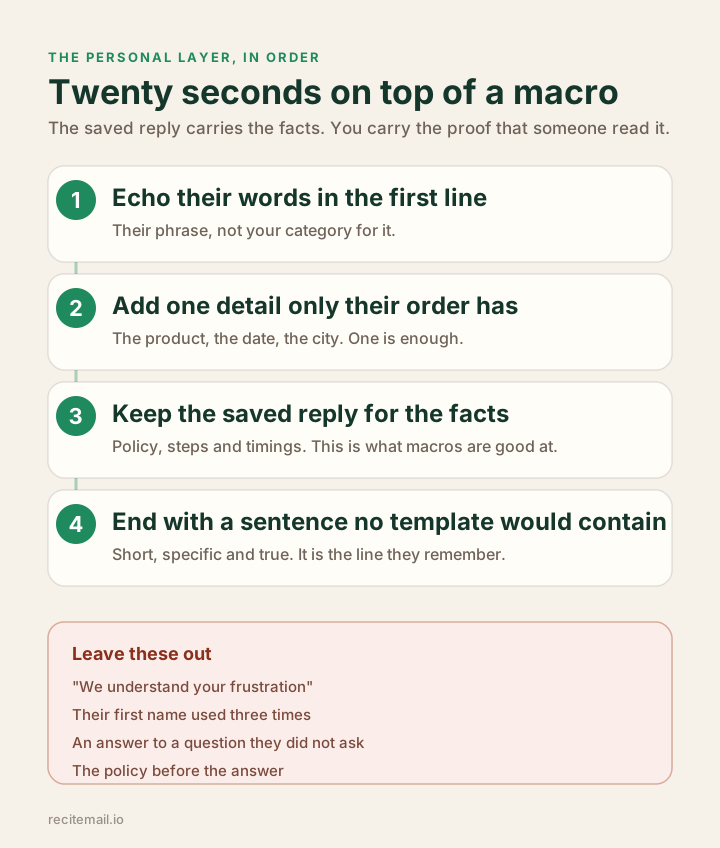
- Read their email for one phrase and one detail. Not the whole thing twice. One phrase that is theirs and one fact about the order.
- Write the first line with both in it. "Sorry the zip on the Harris jacket broke on the second wear. That should not happen."
- Insert the saved reply for the facts. Delete any sentence in it that does not apply to this customer. A macro that offers a refund to someone who asked for a repair reads as unread.
- Write the last line. One sentence only this customer could receive. If nothing comes to mind, skip it. A forced one is worse than none.
Timed honestly, that is about 20 seconds on top of the macro. Across 40 replies a day it is under a quarter of an hour. It is the cheapest improvement available to a small support desk, because it changes how every reply is received without changing a single policy.
It is also the part that slips first when the day gets long. This is the gap ReciteMail was built for. It reads the customer's email from a snip of your screen. Their phrase and their order detail are already in front of it. You say the facts out loud. The draft comes back with the first line, the facts and the last line written as one reply in your own voice. The personal layer stops being an extra step because it is no longer separate from the reply.
Before and after
The customer wrote: "Ordered the oak frame for my mum's 70th on the 3rd, paid for express, it is now the 9th and the party is Saturday. Really disappointed."
Subject: Re: Your order
Hi Sarah, thank you for reaching out. We understand your frustration and apologise for any inconvenience caused. Your order is currently in transit and may be subject to courier delays. Please allow 3 to 5 working days for delivery. You can track your order using the link in your dispatch email. If you have any further questions please do not hesitate to contact us.
Kind regards, Customer Support
Subject: Re: The oak frame for Saturday
Hi Sarah, I am sorry. You paid for express on the 3rd and it is the 9th. That is our failure, not yours. I have checked the tracking: the frame is at the Leeds depot and the courier now shows delivery on Thursday. That is in time for Saturday but too close for comfort. I have refunded the express charge today and I will check the tracking myself on Thursday morning. If it has not moved I will send a second frame by next-day courier that afternoon so your mum has it for her 70th either way.
Best, Tom
How the second reply gets written in a minute
Written by hand, the second reply is five minutes of work: open the order, read the tracking, find the words. Here is the same reply with ReciteMail.
- Snip Sarah's email. Press the snip button and drag over her message on screen. ReciteMail reads it the way you would. Nothing connects to your inbox.
- Say the facts. "Apologise, our fault. Frame is at the Leeds depot, courier says Thursday. Express charge refunded today. I will check Thursday morning. Second frame next day if it has not moved." That takes about fifteen seconds to say.
- Read the draft. It comes back as the reply above: her dates, the oak frame, her mum's 70th and your plan, in the way you write. It knows how you write because it learned from emails you have already sent. It does not use a house style.
- Adjust by voice if you need to. Say "shorter" or "warmer" and it redrafts. Pick a tone before you start if the customer needs a firmer or a softer hand.
- Copy, paste, send. You send it from your own email as always. Nothing sends without you.
The method above adds a personal layer on top of a macro. This way removes the macro. You still supply what only you know, which is the decision. The words arrive already personal.
The second reply is longer. It took about a minute more to write. It contains no new policy. What it contains is proof: her dates, her product, her deadline and a named person who will do a named thing on a named day. Our guide to responding to a customer complaint covers the structure behind it.
When to throw the saved reply away
The personal layer works for most of the inbox. Four kinds of email need a reply written from nothing, because any trace of a template makes things worse.
- The second complaint about the same thing. They have already had your macro once. Sending its cousin tells them nothing has changed. Start with what is different this time.
- The long, emotional email. Someone who wrote four paragraphs needs to see that four paragraphs were read. Answer their points in their order. Our guide to the apology email has the shape.
- The loyal customer. If the order history shows years, say so and mean it. A regular who gets the same reply as a stranger learns exactly what their loyalty is worth.
- Anything that was your mistake. The wrong item, the double charge, the missed promise. Own it in plain words. A macro apology for a specific failure reads as a refusal to admit it. See wrong item sent to a customer.
These four are where a blank page costs the most time and where ReciteMail earns its place. You are not editing a template. You say what you want to tell this one customer and the draft is built from their email and your words. There is no template left in it to notice.
Keep the saved replies from going stale
Once a month, open the saved replies and read each one as if you were the customer. Delete any sentence you would be embarrassed to receive. Check every number, courier name and returns window against what is true today. Remove "we understand your frustration", "any inconvenience caused" and "do not hesitate" wherever they appear. They are the three phrases customers associate most strongly with not being listened to. In ReciteMail you can add them to a banned words list once and they never appear in a draft again. The list is separate for customers and for suppliers. If you need a full set to start from, our fifteen ecommerce customer service templates are written to take a personal first and last line.
Where the 20 seconds goes
The honest difficulty is not knowing what to do. It is doing it on the thirty-fifth reply of the day, when the first line comes out as "sorry for the delay" because there is nothing left for anything better. That is why we built ReciteMail the way we did. The decision stays with you. The typing does not. Every draft is read and sent by a person. It runs on your own PC, never connects to your inbox and nothing sends without you. Our guide to stopping the rewrite has the method. There is a 40 second video.
Fast and personal are not opposites. The facts can come from a saved reply. The proof that someone read the email has to come from a person. ReciteMail drafts both in one go, in your voice, private by architecture because it never connects to your inbox. See ReciteMail for online stores or who it is for.
Common questions
How do you personalise a customer service email quickly?
Keep the saved reply for the facts and add two lines by hand. The first line echoes the customer's own words and names one detail from their order. The last line is a short sentence only that customer could receive. Together they take about 20 seconds and they are what the customer uses to judge whether a person read their email.
Why do customers dislike canned responses?
Because a canned response answers the category of problem and ignores what made the email theirs: their wording, their order and the detail they cared about. The tone can be warm and it still reads as unread. Customers are not objecting to speed or consistency. They are objecting to not being heard.
Is using the customer's first name enough to personalise an email?
No. Every mail merge uses the first name and customers discount it. A name repeated through the email reads as more automated. What works is something a mail merge could not produce: their own phrase, a fact from their order or a line about their situation.
When should I not use a saved reply at all?
On a second complaint about the same issue, on a long emotional email, with a long-standing customer and whenever the problem was your mistake. In those four cases any trace of a template makes the situation worse. Write the reply from nothing and answer their points in their order.
The speed of a saved reply, the feel of a written one
Say the facts out loud and ReciteMail writes the reply in your voice with the customer's own words and order in it. It learns from mail you have already sent, runs on your PC and never connects to your inbox. Free for 7 days, no card needed.
Start your free trial