Comparison
ReciteMail vs Fyxer
Both write email replies in your own voice. One signs in to your mailbox to do it. The other never connects at all. That single difference is usually what decides between them.

In one paragraph
The short answer
Fyxer connects to Gmail or Outlook, sorts your inbox and leaves drafts waiting for you inside it. ReciteMail never connects to a mailbox at all. You bring in the one message you want help with, it writes a reply in your voice and you paste it into your own email and press send. Choose Fyxer if you want drafts appearing in your inbox and you are comfortable granting mailbox access. Choose ReciteMail if you cannot grant that access or you would simply rather not.
Fyxer
An assistant that lives in your inbox. It signs in to Gmail or Outlook, labels and files what arrives, drafts replies in your learned tone and can send a notetaker into your meetings. Everything happens where your mail already is.
ReciteMail
A drafting tool that sits beside your inbox. Nothing to connect and nothing to authorise. You hand it a single email or a screenshot, it returns a finished reply in your voice, then you paste and send it yourself.
The real difference
What each one is allowed to see
Every other difference follows from this one. An assistant that sorts your inbox has to be able to read your inbox. A tool that only drafts does not.
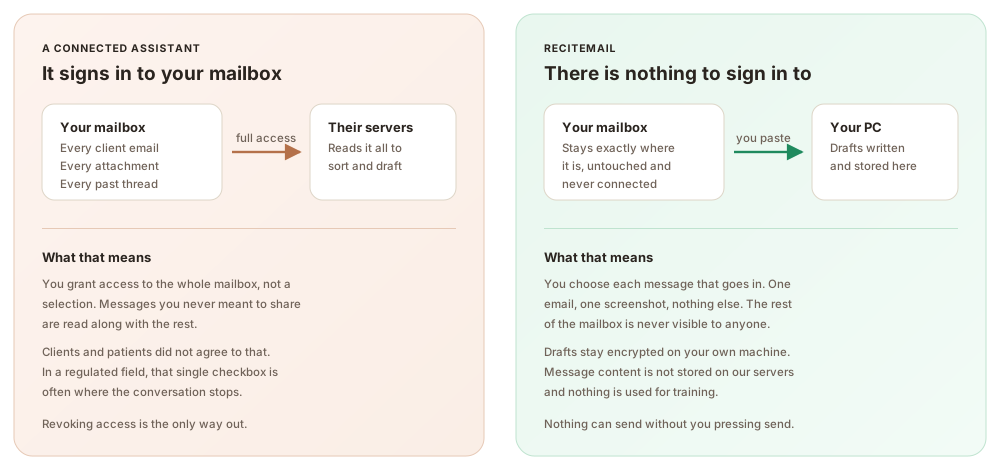
Why this matters more than it sounds. Mailbox access is all or nothing. You cannot grant it for client emails but not the ones from your accountant, your doctor or your solicitor. For a lot of people that is merely uncomfortable. For anyone handling client, patient or case material, it is the point where the evaluation usually stops.
Side by side
ReciteMail and Fyxer compared
Fyxer wins some of these outright. Where it does, the table says so.
| Fyxer | ReciteMail | |
|---|---|---|
| Price | $30 a month, $22.50 billed annually | €29.99 a month, €299 a year |
| As your volume grows | Overage fees once you pass the plan allowance | Unlimited under fair use, the price does not move |
| Mailbox connection | Required, Gmail or Outlook | None, there is nothing to connect |
| What it can read | Your mailbox, to sort and draft | Only the messages you import |
| Where drafts are written | Their servers | Encrypted on your own machine |
| Learns your voice | Yes, from your sent folder | Yes, from emails you import |
| Sorts and labels your inbox | Yes | No, it does not see your inbox |
| Joins and takes notes in meetings | Yes | No |
| Where the draft appears | Waiting in your inbox | In the app, you paste it |
| Runs on | Gmail or Outlook, any operating system | Windows 10 and 11 desktop |
| Can anything send by itself | Drafts wait for you | Never, you press send |
| Free trial | 7 days, no free tier after | 7 days, no credit card |
← Swipe → the table to see every column
Fyxer pricing and features checked on 27 July 2026 from their published pricing and product pages. Prices change. Check theirs before deciding.
Three practical differences
What you actually notice day to day
Your bill does not track your workload
Fyxer charges overage fees when your incoming volume passes the plan allowance. A busy month costs more than a quiet one. ReciteMail is one flat price under a fair use policy. A brutal week and a slow week cost the same.
Nothing to explain to a client
There is no third party with standing access to your mail. There is no access to disclose, review or revoke. If someone asks who can read their correspondence, the answer is nobody but you.
You are the last step, always
ReciteMail cannot send. It has no route to your mailbox. Every message that leaves your business was read and sent by a person. That is a design decision rather than a setting you can switch off.
Being straight with you
When Fyxer is the better choice
Pick Fyxer if any of these matter more to you. You want drafts sitting in your inbox with nothing to paste. You want your inbox sorted and labelled automatically. You want a notetaker that joins calls and writes the follow up. You work on a Mac, since Fyxer runs on top of Gmail and Outlook on any operating system while ReciteMail is a Windows desktop app. Those are real advantages and no comparison table should pretend otherwise.
And be honest about the trade. All of that convenience is bought with mailbox access. If you are comfortable granting it, Fyxer gives you more automation than ReciteMail does. If that access is a problem for you or for your clients, no feature list closes the gap.
Beyond online stores
Who chooses the no-access option
Import-only sounds like a limitation until your work makes mailbox access impossible. Accountants and bookkeepers, clinics and practices, solicitors and conveyancers, research and biotech teams, compliance and risk functions, property managers, agencies and trades all land here for the same reason.
Questions
Common questions
What is the main difference between ReciteMail and Fyxer?
Mailbox access. Fyxer sits on top of Gmail or Outlook and needs permission to read your inbox in order to sort it and draft replies. ReciteMail never connects to any mailbox. You bring in the individual messages you want help with, it drafts a reply in your voice and you paste it into your own email and press send. Everything else in your inbox stays private.
How much does Fyxer cost compared to ReciteMail?
Fyxer Starter is $30 a month or $22.50 billed annually, with a Professional tier at $50. ReciteMail is €29.99 a month or €299 a year. The prices are close, though the models differ: Fyxer charges overage fees when your incoming email volume passes the plan allowance, while ReciteMail is unlimited under a fair use policy at one flat price.
Does ReciteMail need access to my Gmail or Outlook?
No. There is no sign in to your mailbox and no permission to grant. ReciteMail cannot see your inbox. It cannot read messages you did not choose to bring in. That is the whole design. It is why it suits people who cannot hand a third party access to client or patient mail.
When is Fyxer the better choice?
Choose Fyxer if you want drafts waiting inside your inbox without pasting anything, if you need automatic inbox sorting and labelling, if you want a notetaker that joins your meetings or if you work on a Mac. Fyxer runs on top of Gmail and Outlook on any platform, while ReciteMail is a Windows desktop app and you paste the finished draft yourself.
Do both tools learn how I write?
Yes, both study mail you have already sent to pick up your phrasing and tone. The difference is how they get it. Fyxer reads your sent folder through the mailbox connection. ReciteMail learns from a handful of emails you import yourself. You decide exactly what it sees.
Can I try ReciteMail before paying?
Yes. Every plan starts with a 7 day free trial and no credit card is needed. Fyxer also offers a 7 day trial, though it has no free tier beyond that. Full pricing is on the pricing section.
Try the one that never asks for your inbox
Import a few emails, get a draft in your own voice, paste it and send. Free for 7 days, no credit card and nothing to connect.
Start your free trial€29.99 a month or €299 a year after the free week. Windows 10 and 11. Reads and replies in 60+ languages.