How to Hand Over an Inbox to a New Hire in One Afternoon
Published 3 September 2026 · 7 minute read · The ReciteMail Blog
Someone is leaving on Friday and someone else starts on Monday. Between them sits an inbox that answers for your business: the refunds, the chasers, the quotes, the delays, the three suppliers who only respond to a certain tone. Most handovers are a two hour walk through the old mailbox and a shared password. Then the new person spends six weeks learning by getting it slightly wrong in front of customers. It does not have to be six weeks. Done in the right order it is one afternoon. The new hire can answer a real customer in your voice on their first day.
Why the first month costs more than the salary
Nobody budgets for it. The expensive part of a customer-facing hire is the gap between when they start and when they sound like the business. In that gap they promise a refund the policy does not allow, they are curt with the client who needed warmth, they quote last year's lead time because it was in an old thread and they copy a template that reads like it was written by nobody in particular. Every one of those goes to a customer who does not know or care that it is week one.
The gap exists because the knowledge lives in the wrong place. It lives in the head of the person leaving and in the sent folder they leave behind. A handover that moves it into three small files, in an afternoon, closes the gap before it opens.

Before they leave: export the Sent folder
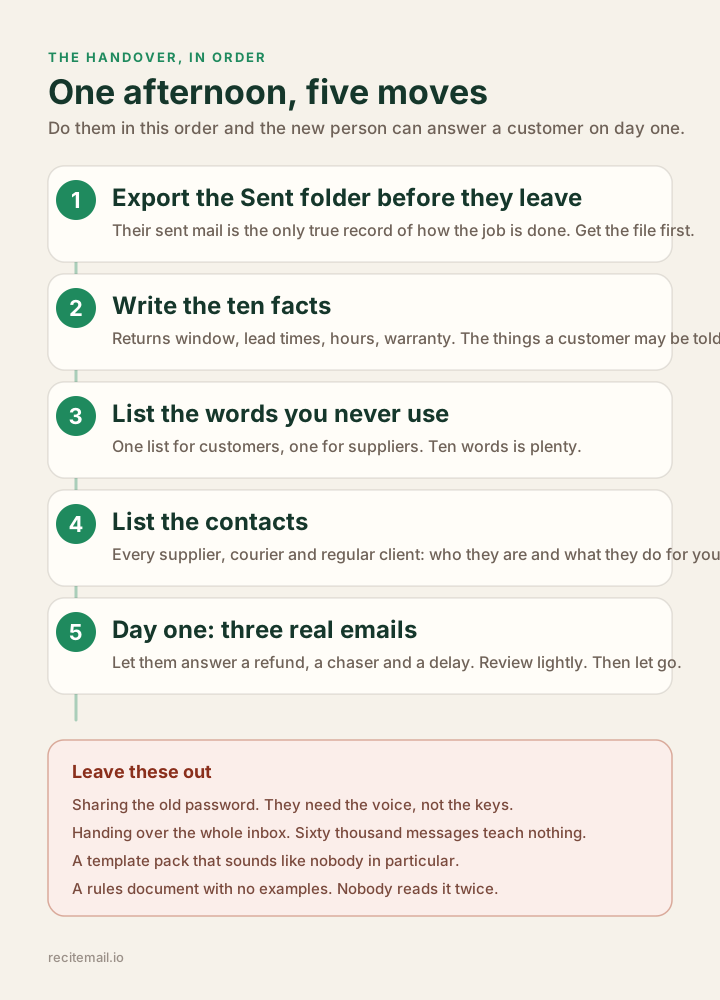
If you do one thing from this post, do this one. Do it before their last day rather than after. The Sent folder of the person who did the job is the only true record of how the job is done. Not the process document, not the training video, the sent folder. It holds how they greeted a regular, how they said no to a discount, how firm they were with the courier, how they signed off on a bad day. A few hundred of those emails teach more than any manual.
Every mail app can export it as a file. Our guides cover the two most common: exporting your sent folder from Outlook, new and classic, and exporting Gmail with Google Takeout. Ten minutes, one file. You have the voice of the business on a memory stick. Do not skip this because they are leaving on bad terms. The emails belong to the business either way.
The afternoon plan
Block out one o'clock to four. Most of this is you rather than the new person. Most of it is writing down things you already know.
- One o'clock: the ten facts. Write down the plain facts a customer may be told. Returns window. Lead times, standard and custom. Delivery areas and what counts as kerbside. Opening hours. Warranty. What the deposit is and when it is non-refundable. Ten lines, not a policy document. These are the things a new hire guesses at when nobody has written them down. A guessed refund policy is the most expensive sentence in your inbox.
- Half one: the words you never use. Two short lists. Words your business never says to a customer: kindly, as per, unfortunately, hesitate, delighted. Words it never says to a supplier: hopefully, no worries, whenever you get a chance. Ten words each is plenty. The list does more to protect the tone than any amount of "be professional".
- Two o'clock: the contacts. Every supplier, courier, regular trade client and partner, with their email domain and one line about what they do for you. Pull it from the last three months of invoices if the leaver cannot tell you. This is the list that stops a new person treating your main supplier like a stranger or a stranger like a supplier.
- Half two: the replies you send most. Open the exported sent folder and find the five emails the business sends over and over: the order update, the quote follow-up, the delay, the gentle reminder, the welcome. Save them as templates. A template is a guide rather than a script. Keep them short and let the new person reshape each one around the real email in front of them. Our post on how to stop rewriting the same emails covers what makes a template sound like a person.
- Three o'clock: day one, planned. Pick three real emails waiting in the inbox for the new person's first morning: one refund, one supplier chase, one delay to announce. Not the easy ones. The point of day one is to send three emails that sound like the business and to feel what that is like, with you reading over their shoulder lightly and then not at all.
What not to hand over
The password. A new hire in their first week should not hold every customer conversation the business has ever had. You should not have to change a password the day they leave. They need the voice, not the keys. The exported sent folder gives them the voice. If continuity genuinely requires access to the old mailbox, use a shared or delegated mailbox your mail provider controls. Access is then a setting you can switch off.
The whole inbox. Sixty thousand messages teach nothing. A new person opens it, feels sick and closes it. The sent folder is the useful part. Even that only needs the last year or two.
A template pack that sounds like nobody. Templates copied off the internet are why customers can tell a new person is answering. If the templates did not come out of your own sent mail, they are not your templates.
A rules document with no examples. "Be warm but professional" means nothing on a Tuesday afternoon with an angry customer in front of you. Ten real emails that were warm and professional mean everything.

Day one, hour one
Sit them down with the three emails you picked. Ask them to reply to each one the way they think the business would, using the facts, the word lists and the templates. Read the drafts before they go. Check only the facts. Do not rewrite the tone. Then send them. The customer will never know it was a first day. The new person now has three of their own sent emails that sound like the business, which is the start of their own voice.
By the end of the first week they will have twenty. By the end of the month you will have stopped reading over their shoulder, because there is nothing to catch.
Where ReciteMail comes in
Everything above works with a mail app and a notepad. ReciteMail was built to do the same afternoon in about ten minutes. It keeps doing it every day after. The exported sent folder is imported once. Because most of it was written by someone who is not the new hire, ReciteMail asks a single question: treat this person as the house voice? Say yes and every draft from then on learns from how your business has always written, while it is signed with the new person's own name. The ten facts go in as Company Facts, the two word lists as Banned Words, the contacts as Contacts. A team pack carries all of it to the new machine in one file with your own name and signature left out. Nothing connects to your inbox or theirs and nothing sends without a person pressing send.
The whole setup is on the new hires page. The step by step version is chapter 6 of the setup guide. If you are hiring someone to answer email this month, it is worth the afternoon either way.
Common questions
How long should an inbox handover take?
One afternoon if you do it in the right order: export the previous person's Sent folder, write down the ten facts a customer may be told, list the words you never use and the contacts you deal with, then let the new person answer three real emails on their first day. Anything longer is usually a sign the handover is happening by reading old threads instead of by doing.
Should a new hire get the previous employee's email password?
No. They need the voice and the facts, not the keys. Export the Sent folder as a file instead. The new person can then learn from how the job was done without holding every conversation the business has ever had. If they must access the old mailbox for continuity, do it through a shared or delegated mailbox your mail provider controls, not a shared password.
What if the person left without a handover?
The owner's sent mail is the next best thing. It is often better, because the owner set the tone in the first place. Export it, write the ten facts from memory and build the contacts list from the last three months of invoices. You will be surprised how much of the job is in those three files.