Freight and Dispatch Email Templates: 10 Replies Logistics Teams Send Daily
Published 5 August 2026 · 11 minute read · The ReciteMail Blog
One load is never one email. By the time the truck is empty and the money is in, a single brokered load has generated somewhere between six and ten emails: the quote, the rate confirmation, the dispatch details, the check call, the delay, the POD chase, the invoice. A desk covering 30 to 50 loads a week is holding 1,500 or more email exchanges over that week, which is how dispatchers end up sending 50 to 100 emails a day without ever once writing something new. None of these emails are hard to write. They are hard to write forty times before lunch while the phone is going and a driver is sitting at a gate.

So here are the ten, written the way a desk actually talks: short, specific and carrying the reference number in the first line. A word of honesty before the copying starts. Templates get you most of the way and then every load turns out to be slightly different, which is why so many template libraries end up abandoned in a folder. The longer fix is a tool that drafts each reply fresh in your own words from a single line of instruction, which is what ReciteMail does and why we built a page about freight desks specifically. The templates below work on their own either way.
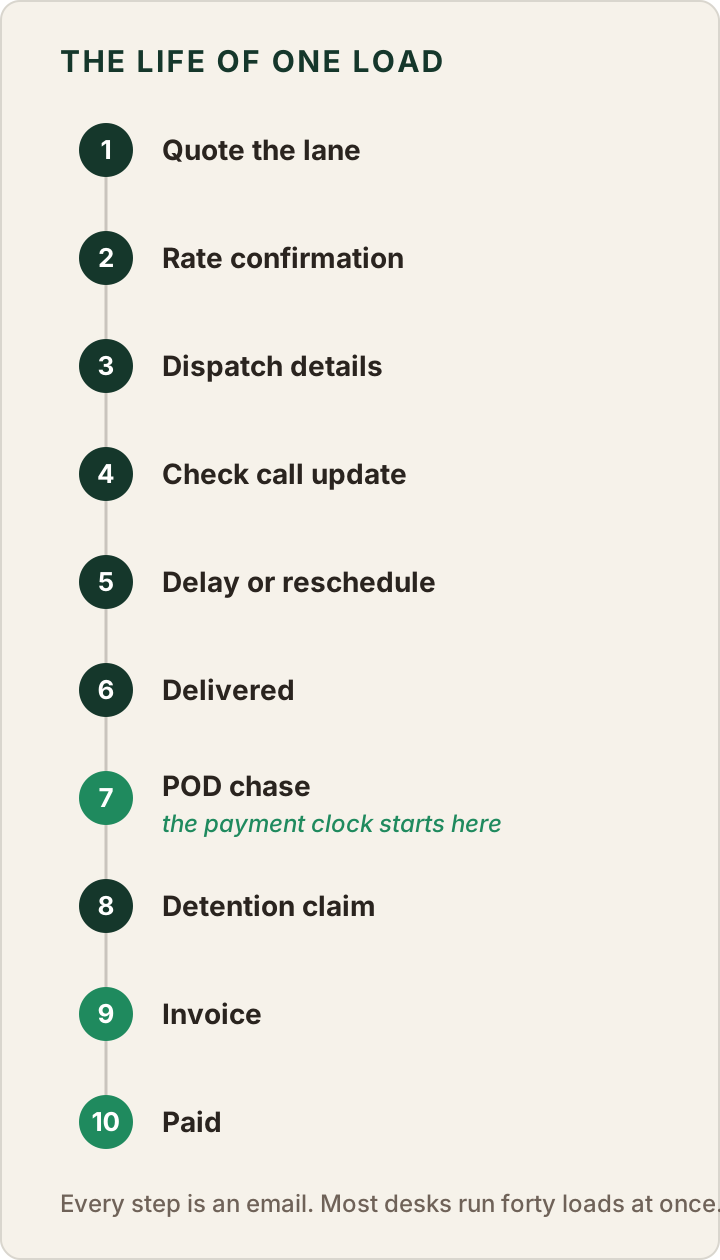
The life of one load
The templates follow one load from the first rate request to the money landing. Carrier onboarding sits slightly outside the sequence because it happens before any load moves, yet it earns its place on the list because every new carrier triggers the same email. Here is the ladder the rest of this post climbs.
How to use these
Anything in square brackets is a fill-in: [LOAD #], [ETA], [RECEIVER] and so on. Keep every number exact, because in freight the numbers are the message. Put the load or reference number in the subject line every single time, since the person on the other end is running forty threads too. And read before you send. A template is a starting point rather than an autopilot.
1. Quoting a lane
A rate request answered fast wins loads that a better rate answered slowly loses. The quote email needs the lane, the equipment, the rate and how long the number stands. Leaving out the validity window is how a rate quoted on Tuesday gets thrown back at you in a soft market three weeks later.
Subject: Quote · [ORIGIN] to [DESTINATION] · [DATE]
Hi [NAME],
Thanks for the enquiry. For [ORIGIN] to [DESTINATION] picking up [DATE], [EQUIPMENT TYPE], we can do [RATE] all-in.
That includes [WHAT IT INCLUDES]. Rate is valid until [DATE/TIME]. If the pickup window moves, let me know and I will re-check it.
Happy to get it booked as soon as you confirm.
[YOUR NAME]
Why it works: one lane, one number, one deadline. Nothing for the shipper to chase you about except yes.
2. The rate confirmation
The rate con is the contract, which makes this email less about warmth and more about leaving no gap between what was agreed on the phone and what is in writing. Send it while the call is still warm.
Subject: Rate confirmation · Load [LOAD #] · [ORIGIN] to [DESTINATION]
Hi [NAME],
Good talking just now. Attached is the rate confirmation for load [LOAD #]: [ORIGIN] to [DESTINATION], picking up [DATE/TIME], delivering [DATE/TIME], [RATE] all-in.
Please sign and return before the driver is dispatched. Driver name and cell to me once assigned.
Detention and any accessorials are per the attached terms. Any problem with the appointment times, flag it now rather than at the gate.
[YOUR NAME]
Why it works: it asks for the two things desks always end up chasing later, the signed con and the driver's details, in the same breath as the booking.
3. Dispatch details
The dispatch email is the one the driver actually works from, which is why everything they need at the gate goes in one message they can find at 5am: addresses, appointment times, reference numbers, who to call when something goes sideways.
Subject: Dispatch · Load [LOAD #] · picks [DATE]
Hi [NAME],
Dispatch details for load [LOAD #]:
Pickup: [FACILITY, ADDRESS], [DATE/TIME]. Pickup # [REF].
Delivery: [FACILITY, ADDRESS], [DATE/TIME]. Delivery # [REF].
Commodity: [WHAT], [WEIGHT], [PIECE COUNT].
Driver checks in with [NAME/DESK] on arrival. Any delay over 30 minutes, call me on [PHONE] straight away rather than after the appointment is gone.
[YOUR NAME]
Why it works: the line breaks. A driver skims this in a truck stop car park. Blocks of prose get misread and misread dispatch info is how appointments die.
4. The check call update
The proactive status email is the cheapest customer service in freight. The shipper wants it before they have to ask, because the moment they ask you have already spent a little trust. A good check call answers the next question too: when do I hear from you again.
Subject: Update · Load [LOAD #] · on schedule
Hi [NAME],
Quick update on load [LOAD #]: loaded and rolling as of [TIME]. Driver is currently [LOCATION] and tracking on for delivery [DATE] at [TIME].
Next update at [TIME/CHECKPOINT] or immediately if anything changes.
[YOUR NAME]
Why it works: reference, status, ETA, next checkpoint. Four facts and it closes the thread. The last line is the whole trick, because an update that names the next update stops the 3pm "any news?" email from ever being written.
5. The delay
Bad news travels best when it travels early and plainly. State the slip, the reason, the new ETA and what you are doing about it. Do not soften the new time to make the email easier to send, because a second delay email costs far more than an honest first one.
Subject: Delay · Load [LOAD #] · new ETA [DATE/TIME]
Hi [NAME],
Flagging a delay on load [LOAD #]. The truck is held up by [REASON] near [LOCATION]. Realistic new ETA is [DATE/TIME], which is [X] hours behind the appointment.
I have already [WHAT YOU HAVE DONE: notified the receiver / requested a new window / put a backup option on standby]. I will confirm the new delivery time by [TIME].
Sorry for the disruption. You will hear from me before you need to chase it.
[YOUR NAME]
Why it works: the shipper's real question during a delay is not "where is the truck" but "do I need to manage this myself". The middle paragraph answers no.
6. Rescheduling the delivery appointment
The reschedule request goes to the receiving warehouse and warehouses answer specifics, not stories. Give them the load, the original slot, the reason in one clause and two or three windows that work.
Subject: Reschedule request · Load [LOAD #] · delivery [ORIGINAL DATE]
Hi [NAME],
We have load [LOAD #] booked into you [ORIGINAL DATE/TIME] under delivery # [REF]. Due to [REASON] the truck will miss that window.
Could we rebook into any of the following: [OPTION 1], [OPTION 2] or [OPTION 3]? Earliest is best for us.
I will confirm the driver against whichever slot works within the hour.
[YOUR NAME]
Why it works: offering windows converts a back-and-forth negotiation into a single pick-one reply, which is the difference between rebooking today and rebooking Thursday.
7. The POD chase
Here is the part of the job that looks like admin and is actually billing. The signed proof of delivery is the document that starts everything: until it is in hand the invoice cannot go out and until the invoice goes out the payment clock does not start. The benchmark for a well-run desk is chasing it within 24 hours of delivery. Plenty of desks drift to 48 or 72 and every one of those hours is added to the wait for the money.
Subject: POD needed · Load [LOAD #] · delivered [DATE]
Hi [NAME],
Load [LOAD #] delivered [DATE] to [RECEIVER]. Could you send over the signed POD and any lumper or scale receipts?
We cannot release your invoice for payment until the POD is in. The sooner it lands the sooner your clock starts.
A photo of the signed BOL from the driver's phone is fine to get things moving.
[YOUR NAME]
Why it works: it aligns interests instead of nagging. The middle line quietly points out that the delay is costing the carrier rather than you, while the last line removes the most common excuse by lowering the bar to a phone photo.
8. The detention claim
Detention is won on timestamps rather than tone. Most facilities allow two hours of free time before detention starts, billed by the hour after that. The claim email should read like a record, not a complaint: times, references, the maths and the ask.
Subject: Detention claim · Load [LOAD #] · [FACILITY], [DATE]
Hi [NAME],
Submitting detention on load [LOAD #] at [FACILITY] on [DATE].
Appointment: [TIME]. Arrived and checked in: [TIME]. Loaded/unloaded and gate out: [TIME]. Total time on site [X] hours against [Y] hours free time, leaving [Z] billable hours at the agreed [RATE] per hour: [TOTAL].
Gate record and timestamped check-in attached. Please confirm approval so we can add it to the invoice for this load.
[YOUR NAME]
Why it works: it makes approval the path of least resistance. Everything the other side needs to verify is in one place and there is not a single emotional word for anyone to push back against.
The detention gap is documentation. More than 90 percent of carriers charge detention yet fewer than half actually collect it. The claims that get paid are almost never the angriest ones. They are the ones with a gate-in time, a gate-out time and the arithmetic already done. Keep the record and the email above writes itself.
9. Carrier onboarding
Every new carrier means the same document round-up before anything moves: authority, insurance, W-9, the signed packet. One email that lists everything beats four emails that each remember one thing.
Subject: Setup docs · [CARRIER NAME] · ready to load once complete
Hi [NAME],
Good to have you on board. To get you set up and loadable we need the following:
1. Signed carrier packet (attached)
2. Certificate of insurance with us listed as certificate holder
3. Copy of operating authority
4. W-9
Reply to this email with all four and we can have you moving freight the same day. Anything missing is the only thing that slows this down.
[YOUR NAME]
Why it works: the numbered list becomes the checklist on both ends and the subject line ties the paperwork to the thing the carrier actually wants, which is the load.
10. The invoice and the payment chase
Standard broker terms run Net 30 and the industry average sits around 33 days from invoice. Quick pay exists for a reason: carriers routinely give up 1.5 to 5 percent of a load just to see the money in days instead of weeks, which tells you exactly how much a clean and prompt invoice email is worth. When the 30 days pass quietly, the chase should be firm, specific and boring.
Subject: Invoice [INV #] · Load [LOAD #] · POD attached
Hi [NAME],
Please find attached invoice [INV #] for load [LOAD #], delivered [DATE]. Signed POD and rate confirmation attached. Terms are Net 30, due [DUE DATE].
Any queries on the paperwork, flag them this week so they do not hold up the run.
[YOUR NAME]
The chase, when the due date passes:
Subject: Past due · Invoice [INV #] · Load [LOAD #]
Hi [NAME],
Invoice [INV #] for load [LOAD #] fell due on [DUE DATE] and has not yet arrived. All paperwork went over with the invoice on [SENT DATE].
Could you confirm the payment date this week? If anything is missing on your side, tell me today and I will close the gap within the hour.
[YOUR NAME]
Why it works: the invoice email pre-empts the classic stall by inviting paperwork queries early, which means "we had a query on the POD" cannot appear for the first time on day 45. If chasing money is a regular part of your week, there is a full ladder of late payment templates that goes from friendly nudge to final notice.

The problem with all ten of these
They still have to be filled in, adjusted and typed forty times a day, by the same person who is answering the phone, watching the tracking and calming a driver at a gate. Templates remove the thinking and leave all the typing.
This is the actual reason we wrote this post. ReciteMail is a Windows app that drafts these emails in your own voice from one line of instruction. You say or type "tell them the truck is two hours out and apologise for the gate delay" and the finished email comes back written the way you write, with the load numbers exactly as you gave them. It learns your voice from sent emails you choose to import and it works beside your TMS and load board rather than replacing anything.
The part that matters for a freight desk specifically: it never connects to your mailbox. Your inbox holds your customer list, your rate sheets and the margin on every lane you run. A tool that signs into your email can read all of that forever. ReciteMail sees only the single message you paste in or snip off the screen, while everything it learns from lives in an encrypted database on your own PC. How that works is spelled out plainly on the security page. And if you want the general version of this system beyond freight, the longer piece on building a reply library covers it.
Common questions
How many emails does one freight load generate?
Six to ten is the working range for a brokered truckload once you count the quote, the rate confirmation, the dispatch details, at least one check call, any delay or reschedule, the POD chase and the invoice. A desk covering 30 to 50 loads a week is holding 1,500 or more email exchanges over that week, which is why dispatchers commonly send 50 to 100 emails a day without ever writing anything new.
What should a check call email include?
Four things: the load or reference number, the current status in plain words, the ETA and the next checkpoint. The next checkpoint is the part most people skip and it is the part that stops the shipper emailing you again in three hours. An update that says when the next update is coming closes the thread instead of opening a new one.
How do I write a detention claim that actually gets paid?
Lead with the timestamps and keep the emotion out. State the load number, the facility, the appointment time, the gate-in and gate-out times, the free time allowed and the billable hours left over, then attach whatever record you have. Most facilities allow two hours of free time before detention starts. More than 90 percent of carriers charge detention yet fewer than half collect it. The difference is almost always documentation rather than persuasion.
When can I invoice a load?
Once the signed proof of delivery is in hand. The POD is the document that starts everything: until it comes back the invoice cannot go out and until the invoice goes out the payment clock does not start. Standard terms are Net 30 and the industry average sits around 33 days from invoice, which is why a well-run desk chases the POD within 24 hours of delivery instead of letting it drift to 48 or 72.
Do these templates work for carriers and dispatchers as well as brokers?
Yes. The load lifecycle is the same conversation seen from different chairs. A carrier-side dispatcher sends the check call instead of requesting it and receives the rate confirmation instead of issuing it, yet the wording barely changes. The templates also sit happily alongside a TMS or load board, because those systems move the data while a person still types the emails.
Your desk sends these forty times a day
Import a handful of sent emails so it learns how you write, then run a week of check calls, POD chases and detention claims through it. Every draft comes back in your voice with the load numbers exactly as you gave them. It never connects to your mailbox and nothing sends without you. Free for 7 days, no credit card.
Start your free trial