Christmas Closure Email to Customers: 4 Templates for Your Holiday Hours
Published 30 October 2026 · 3 minute read · The ReciteMail Blog
Most Christmas closure emails open with a paragraph of festive wishes and bury the dates in the third line. Customers skim straight past them, then email on 28 December asking where their order is. The fix is simple: every closure email leads with the dates. The wishes can follow. Here are four short templates for the Christmas break, with example dates for this year.
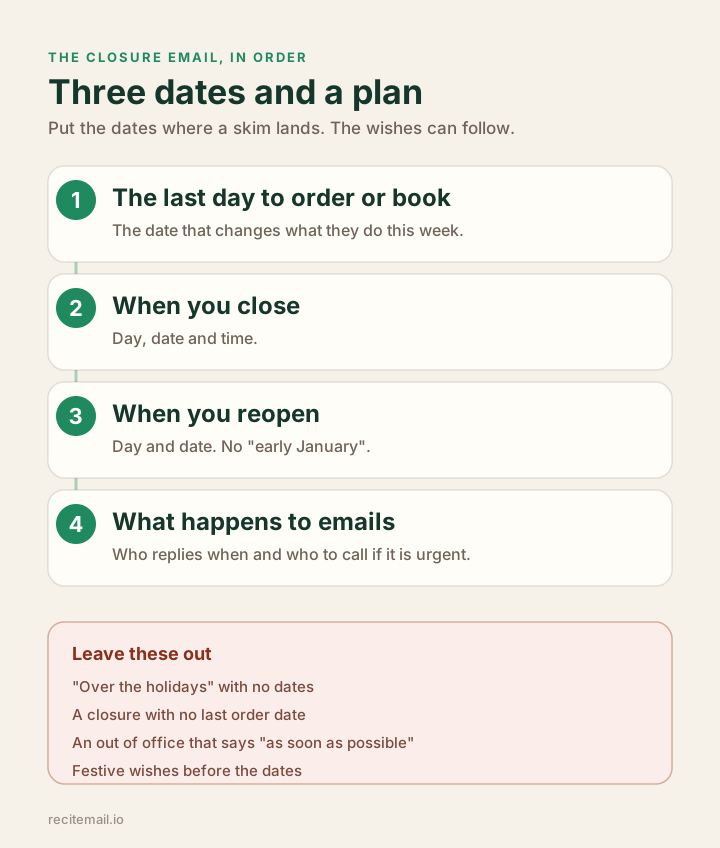
The four details every closure email needs
The examples below use Christmas 2026: closing at 1pm on Wednesday 23 December and reopening on Monday 4 January 2027. Swap in your own dates. If you sell physical products, your last order date depends on your couriers. Our Christmas shipping cutoff templates cover that email in detail.
1. The announcement (early December)
Subject: Our Christmas hours: last orders Friday 18 December
Hi Amara, a quick note on our Christmas hours so you can plan ahead:
1. Last day to order for delivery before Christmas: Friday 18 December
2. We close at 1pm on Wednesday 23 December
3. We reopen on Monday 4 January
Any orders placed while we are closed will be packed and sent on 4 January. Thank you for your support this year. We hope you have a lovely Christmas.
Best regards,
Leah
2. The reminder (the week before)
Shorter. Its only job is the deadline.
Subject: Last orders for Christmas: this Friday
Hi Amara, a reminder that Friday 18 December is the last day to order for delivery before Christmas. We close at 1pm on Wednesday 23 December and reopen on Monday 4 January. If you have a question about an order, reply before Wednesday and we will sort it before we close.
Best regards,
Leah

3. The out of office (while you are closed)
This is the one most businesses get wrong. "We will get back to you as soon as possible" tells nobody anything. Give the reopening date, say when you will reply and give a route for anything urgent. Our guide to out of office messages for small businesses has more versions.
Subject: We are closed for Christmas until Monday 4 January
Hi, thanks for your email. We are closed from 1pm on Wednesday 23 December until Monday 4 January. We will reply to every email by Wednesday 6 January, oldest first. Orders placed while we are closed will be sent on 4 January. If something is genuinely urgent, such as a problem with an order that has arrived damaged, call [your number] and leave a message. We check it once a day.
Best regards,
Leah
4. The reopening email (January)
Optional. Worth sending if customers placed orders over the break or you have news for the new year. Keep it short.
Subject: We are back: orders from the break are on their way
Hi Amara, we are back and every order placed over Christmas went out today. You should have a tracking email by this evening. If you emailed us over the break, you will hear from us by Wednesday. Happy new year.
Best regards,
Leah
Clearing the January pile
The out of office promises replies by 6 January. That promise is easier to make than to keep when 140 emails are waiting on the 4th. ReciteMail helps with the pile. Snip each email, say the answer in a sentence and the reply comes back in your own voice. Read it, paste it, send it, move on. It runs on your PC and never connects to your inbox. This 40 second video shows how it works. If you are already behind, our guide to apologising for a late reply is where to start.
Lead with the dates. The wishes can follow. The last order day, the closing day, the reopening day and what happens to emails in between. See who ReciteMail is for.
Common questions
When should you send a Christmas closure email?
Send the announcement in early December, at least two weeks before your last order or booking date. Send a short reminder the week before you close. Set your out of office on the day you close and send an optional reopening email when you are back.
What should a Christmas closure email include?
The last day to order or book, the day and time you close, the day you reopen and what happens to emails and urgent problems while you are closed. Put those dates at the top, ideally as a short list, before any festive message.
What should a Christmas out of office message say?
The dates you are closed, the date you will reply by and a route for anything genuinely urgent, such as a phone number checked once a day. Avoid "as soon as possible", which gives the customer nothing to plan around.
The January pile, cleared in the first morning
Snip each email, say the answer and ReciteMail writes the reply in your own voice. It learns from mail you have already sent, runs on your PC and never connects to your inbox. Free for 7 days, no card needed.
Start your free trial