Appointment Reminder Email Templates: 7 That Stop No-Shows
Published 20 August 2026 · 7 minute read · The ReciteMail Blog
An empty chair at 10am is the most expensive kind of quiet: the slot was booked, the time was reserved, the money walked. Most no-shows are not rudeness, they are forgetting. Forgetting is a solvable problem. A simple confirm-remind-nudge rhythm cuts no-shows by a third to a half for most appointment businesses, which for many diaries is thousands a year recovered by three short emails. Here is the rhythm, the wording that makes rescheduling easier than vanishing, plus seven copy-paste templates from the instant confirmation to the kind follow-up after someone does not turn up.
No-shows are a memory problem, not a manners problem
The client who missed this morning's appointment almost certainly did not decide to skip it. They booked it a fortnight ago, life piled up and the slot simply fell out of their head. That reframe matters because it changes the fix. You cannot email someone into better manners. You can absolutely email them into remembering. The businesses that do it systematically, clinics, salons, trades doing site visits, consultants running calls, see no-show rates drop by a third to a half once reminders become routine.
The other half of the fix is stranger: make cancelling easier. A client who realises they cannot make it faces a small social cost to telling you. If telling you is awkward, they take the coward's exit and just do not come. Every template below carries the same quiet line: if the time no longer works, reply and we will move it, no trouble. You want the reschedule, because a moved appointment is revenue delayed while a no-show is revenue gone.
The reminder rhythm
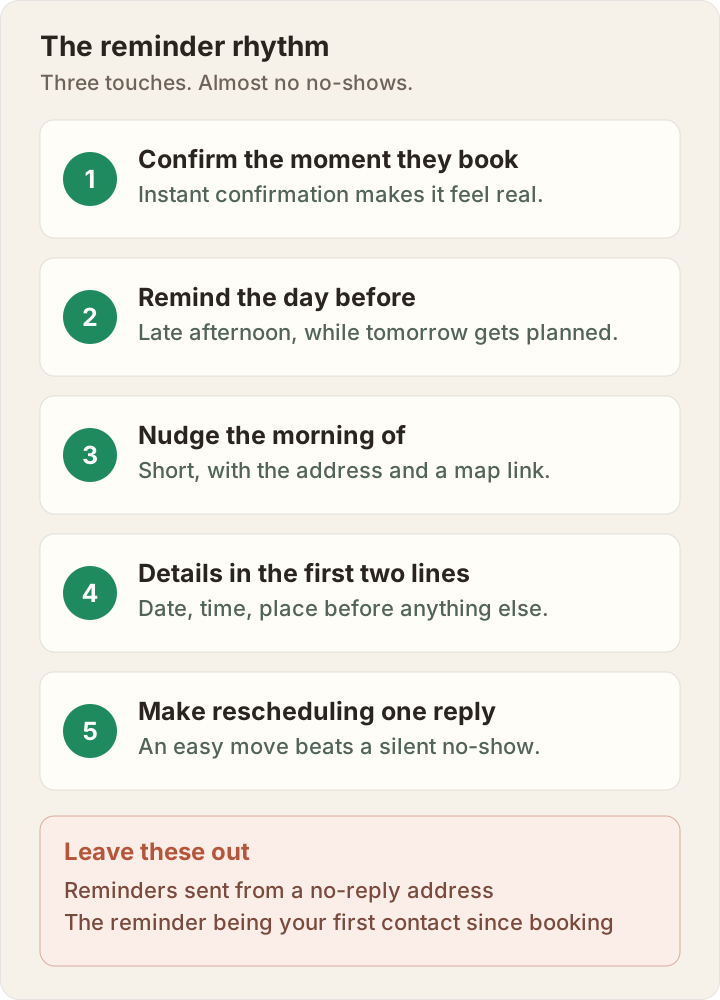
- Confirm the moment they book. The instant confirmation makes the appointment feel real and gives them something to find later when they think "when was that again?".
- Remind the day before, late afternoon, when people plan tomorrow. This one catches the forgotten diary.
- Nudge the morning of, early and short. This one catches the chaotic day. Two reminders beat one because they catch different failures.
- Date, time, place in the first two lines. Most reminders are read in a phone preview pane. The facts go before the pleasantries.
- Make rescheduling one reply. And send from an address a reply actually reaches. A reminder from no-reply with no exit is half a reminder.
Appointment email templates
Seven templates covering the full arc. Swap the brackets and keep each one shorter than feels natural: the reminder that fits in a preview pane is the one that works.
Subject: Confirmed: [service], [day, date] at [time]
Hi [name], you are booked in. [Service] on [day, date] at [time], at [address / video link]. It takes about [duration] and [anything to bring or do beforehand, e.g. please have the paperwork from your last visit handy]. If the time stops working for you, just reply and we will move it, no trouble at all. Looking forward to seeing you.
[Your name], [business]
Subject: Tomorrow at [time]: your [service] with [business]
Hi [name], a quick reminder that your [service] is tomorrow, [day], at [time], at [address]. [One practical line, e.g. parking is free behind the building / the visit takes about an hour]. If tomorrow no longer works, reply now and we will find you a better slot rather than lose the time. Otherwise, see you at [time].
[Your name], [business]
Subject: Today at [time]: [service] at [business]
Morning [name], see you today at [time] for your [service]. We are at [address], map here: [link]. Running late? Just reply or call [number] and we will hold what we can. See you soon.
[Your name], [business]
Subject: Re: [their subject]
Hi [name], no problem at all, thanks for telling us rather than leaving the slot empty, genuinely appreciated. Here are the next openings: [slot one], [slot two] or [slot three]. Reply with the one that suits and it is yours, confirmation to follow straight away. If none of those work, tell me roughly what does and I will find something.
[Your name], [business]
Subject: We missed you today, [name]
Hi [name], we had you booked for [time] this morning and missed you, hope everything is okay on your end. These things happen. If you would like to rebook, I can offer [slot one] or [slot two], just reply with either and it is done. [If applicable, as policy not punishment: a heads-up that our missed-appointment policy means [the policy], which applies from the second miss.] Hope to see you soon.
[Your name], [business]
Subject: Running about [X] minutes behind for your [time] slot
Hi [name], honesty first: we are running about [X] minutes behind this [morning / afternoon]. Your [time] appointment will start closer to [revised time]. If that squeezes your day, reply and we will rebook you as a priority instead, your call entirely. Sorry for the shuffle and thank you for the patience. It will not be wasted time when you are in the chair.
[Your name], [business]
Subject: [Name], it is about time for your next [service]
Hi [name], it has been [interval] since your last [service] with us, which is right around when most people book the next one. If you would like to come back in, here are a few openings this fortnight: [slot one], [slot two], [slot three]. Reply with one and you are booked, confirmation straight back. If the timing is off, no pressure at all, we will give you another shout in [interval]. It would be lovely to see you again.
[Your name], [business]
The reminder is also a marketing email in disguise
Look at what templates one, two and seven quietly do beyond reminding: they demonstrate that your business is organised, warm and easy to deal with, three times before the client even arrives. The recall in template seven is the sleeper: for salons, clinics, servicing trades and anyone whose work repeats on a cycle, a friendly nudge at the natural interval refills the diary from people who already trust you, which costs nothing next to finding a stranger. And the moment the appointment itself goes well is the perfect moment for the next email in the chain: the review ask. A full diary and a strong review page are usually the same handful of emails, sent consistently.
Consistency is the hard part
None of these emails is difficult. What is difficult is Tuesday: nine bookings, two reschedules, one no-show and a recall list you have not touched since spring, all needing the same warm, specific messages while the actual work happens. That is when reminders stop going out and the no-show rate drifts back up. The fix is the one that runs through every repeating email: a structure you trust and drafts that start in your voice.
That is the job ReciteMail does. It learns how you write from emails you have already sent, then turns "remind Rachel, tomorrow 2pm, the colour appointment, parking out back" into a complete, warm reminder in seconds and does the same for the reschedule, the no-show follow-up and the recall. The fortieth one sounds as personal as the first. It runs on your PC, never connects to your inbox and your client book stays entirely on your machine. Like the welcome email, these are relationship emails wearing admin clothing and they deserve to sound like you.
The maths that makes this worth automating. Take your average appointment value, count last month's no-shows and multiply. For most appointment businesses that number dwarfs what any software costs. The rhythm above recovers a third to a half of it. Three short emails per booking. See who ReciteMail is for.
Common questions
How many appointment reminders should you send?
Three touches: an instant confirmation when they book, a reminder the day before and a short nudge the morning of. Two reminders outperform one because they catch different failure modes: the day-before catches the forgotten diary and the morning-of catches the chaotic day. More than three tips into nagging. Automated properly, this rhythm cuts no-shows by a third to a half for most appointment businesses.
When is the best time to send appointment reminders?
The day-before reminder lands best in the late afternoon, around four to six, when people are looking at tomorrow and planning it. The morning-of nudge lands best early, around seven to nine, before the day starts eating attention. The confirmation is different: it goes instantly on booking, because its job is to make the appointment feel real while the decision is fresh.
What should an appointment reminder email say?
Date, time and place in the first two lines, before anything else, because most reminders are read in a preview pane on a phone. Then anything the client must bring or do beforehand. Then the reschedule path: one reply or one tap. Keep the morning-of version shortest of all, with the address and a map link. Everything else, warmth included, comes after the facts.
How do you follow up after a no-show?
Kindly and the same day, assuming the best: we missed you this morning, hope everything is okay, here are two slots if you would like to rebook. Most no-shows are embarrassed, not hostile. A warm message converts a large share into rebookings while a scolding one loses the client for good. If your business has a missed-appointment fee, apply it consistently and mention it as policy rather than punishment.
A full diary, three short emails at a time
ReciteMail drafts confirmations, reminders, recalls and every repeating client email in your own voice, learned from mail you have already sent. It runs on your PC, never connects to your inbox and your client book never leaves your machine. Free for 7 days, no card needed.
Start your free trial