Comparison
ReciteMail vs MailMaestro
MailMaestro is the closest thing to ReciteMail on this whole site. It drafts email in your style, it covers Outlook and Gmail and it starts at $12 a month. The difference is not what it writes. It is what it has to be given in order to write it.

In one paragraph
The short answer
These two are genuinely close. Both write full email drafts. Both promise to sound like you rather than like a template. MailMaestro is an add-in that installs into Outlook or Gmail and works where you already read your mail. It has a free tier and paid access from $12 a month, which undercuts us. ReciteMail is a separate Windows app that never connects to any account. You hand it one message by pasting it or snipping it off the screen, it drafts a reply in your voice and you send it yourself. 29.99 euro a month. If being inside the mail client matters more to you than never granting access, MailMaestro is the better fit and the cheaper one.
MailMaestro
An assistant inside your mail client. An add-in for Outlook and Gmail that drafts replies, summarises threads and adapts to your writing style. It sits in the window where you already work. There is nothing to switch to and nothing to paste.
ReciteMail
An assistant beside your mail client. A separate Windows app. Nothing installs into your mailbox and nothing signs in. You give it one message at a time by pasting it or snipping it from the screen, then send the draft from whatever mail app you already use.
The structural difference
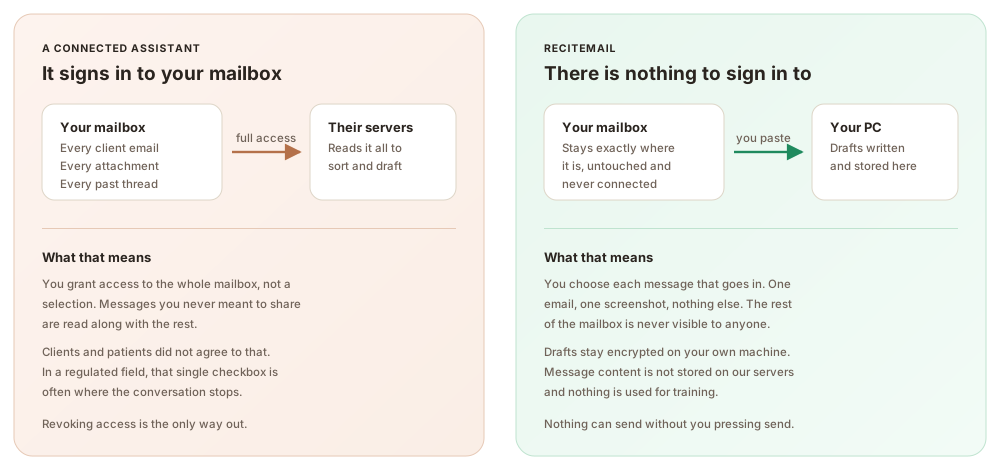
What each one is allowed to see
This is the whole difference between the two products. An add-in has to be given access to your mail in order to sit inside it. That is not a flaw in MailMaestro, it is what being an add-in means. ReciteMail gave up the convenience of living inside the client precisely so it would never need that access.
Side by side
ReciteMail and MailMaestro compared
MailMaestro wins several rows outright. The table marks them the same way as ours.
| MailMaestro | ReciteMail | |
|---|---|---|
| What it is | An add-in inside Outlook and Gmail | A separate Windows app |
| Price | Free tier, paid from $12 a month | €29.99 a month or €299 a year |
| Free tier | Yes | No, a 7 day trial instead |
| Drafts in your style | Yes | Yes, learned from sent mail you import |
| Mailbox connection | Required, it lives in the client | None, there is nothing to connect |
| Where you work | In the email window itself | Beside it, paste or snip the message across |
| Works on mail outside an inbox | No, it is bound to the client | Yes, any text on screen |
| Dictate the reply | Not the main way in | Yes, say one line and read the draft |
| Where your mail is stored | With the vendor, as the add-in requires | Encrypted on your own PC |
| Platforms | Outlook and Gmail, including web | Windows 10 and 11 only |
← Swipe → the table to see every column
MailMaestro pricing checked on 3 August 2026 from the published MaestroLabs plans. There is a free tier and paid access from $12 a month, with a 14 day trial. MaestroLabs also sells TeamsMaestro and a MaestroDuo bundle, which are separate products.
Three practical differences
What you actually notice day to day
Inside the client against beside it
MailMaestro wins on convenience and it is not close. The draft appears in the window you were already looking at, with nothing to copy across. ReciteMail asks for one extra step: snip the message off the screen or paste it in. That step is not an oversight. It is the reason nothing has to be connected. It is also the only way to keep the rest of your mailbox out of the arrangement entirely.
Twelve dollars against thirty euro
MailMaestro is cheaper and it has a free tier, which we do not. If price is the deciding factor the comparison ends here and you should use MailMaestro. What the higher price buys is a different architecture rather than more features: an app that holds your imported mail in an encrypted database on your own machine, with no account linked to anything and nothing to revoke if you change your mind.
Typing against talking
Both tools take a written instruction. ReciteMail also takes a spoken one. A floating bar sits above whatever you are doing, you press the mic and say tell him the part ships Friday and apologise for the delay, then read the finished draft. For anyone who thinks faster than they type or who is answering email between other jobs, that is the day to day difference rather than the privacy argument.
Being straight with you
When MailMaestro is the better choice
Pick MailMaestro if you want it inside Outlook itself. It is cheaper, it has a free tier and it works exactly where you already read your mail. If you are comfortable granting an add-in access to your mailbox, which most people reasonably are, then the convenience is real and the price is better. It also runs wherever Outlook and Gmail run, including the web, while ReciteMail is Windows only. Choose ReciteMail when the access itself is the thing you want to avoid, when the messages you answer arrive from places other than an inbox. Or when you would rather dictate a line than type a prompt.
Beyond one inbox
Who chooses the no-access option
Stores, accountants, clinics, solicitors, compliance teams, property managers, agencies and trades. Anywhere handing an app your whole mailbox is the sticking point, drafting beside it is the answer.
Questions
Common questions
Is MailMaestro better than ReciteMail?
For convenience and price, often yes. It works inside Outlook and Gmail with nothing to paste across, it has a free tier and paid access starts at $12 against our 29.99 euro. ReciteMail is better when you do not want any tool connected to your mailbox, when the message you need to answer did not arrive in an inbox. Or when you would rather dictate the reply than type an instruction.
Does MailMaestro need access to my mailbox?
Yes. It installs as an add-in inside Outlook or Gmail, which is exactly why it is convenient. That is how the category works and it is not a criticism of the product. ReciteMail took the opposite route: no add-in, no sign-in and no permission, at the cost of one extra step to bring the message across.
Do both really write in my own style?
Both make that promise and both do a reasonable job. ReciteMail builds its picture from sent emails you import yourself. It therefore has your actual greetings, your way of explaining a delay and your sign-off to work from. Whichever you choose, read the first week of drafts closely. Style matching is the claim easiest to make and hardest to verify.
Which one works on Mac?
MailMaestro, since it runs wherever Outlook and Gmail run, including the web. ReciteMail is Windows 10 and 11 only. If your machine is a Mac then this comparison is already settled.
What happens to my email in each one?
MailMaestro processes mail through its own service, as any add-in must. With ReciteMail, everything you import is stored in an encrypted database on your own PC and the rest of your mailbox is never seen at all. When you ask for a draft, only that one message plus your instruction travels over a secure connection. It is not stored by us and never used for training.
What does ReciteMail cost?
29.99 euro a month or 299 euro a year, unlimited drafting under fair use. One account covers two computers. The trial runs 7 days with no card needed.
The same job, without the access
Keep your mail client exactly as it is. Import a few sent emails so it learns how you write, then answer this week's replies in minutes. Free for 7 days, no credit card and nothing to connect.
Start your free trial€29.99 a month or €299 a year after the free week. Windows 10 and 11. Reads and replies in 60+ languages.