Comparison
ReciteMail vs Grammarly
Grammarly makes the sentences you type better: grammar, tone, clarity, everywhere you write. ReciteMail removes most of the typing: you show it the customer's email, say what to tell them and it writes the whole reply in your voice. They are different jobs. This page is honest about which is which.

In one paragraph
The short answer
Grammarly is a writing assistant that lives in your browser and apps, checking and improving whatever you type: grammar, spelling, tone, full sentence rewrites, with a generous free tier and Pro at $12 a month billed yearly or $30 month to month. You still write the email. It makes the email better. ReciteMail starts one step earlier. You do not write the reply at all: you snip the customer's email off your screen, say one line about what you want to get across and the finished reply appears in your tone, learned from emails you have already sent. 29.99 euro a month after a free week. If your bottleneck is typos, Grammarly. If your bottleneck is that forty replies a day each take five minutes to compose, that is the problem ReciteMail exists for.
Grammarly
A checker for everything you type. Runs in your browser, Word, Outlook and most apps, underlining mistakes and offering rewrites as you type. Tone suggestions, clarity edits and full sentence rewrites on the paid tier. The writing is still yours. Grammarly makes it cleaner and more confident wherever you happen to be typing.
ReciteMail
A drafter that starts before you type. A Windows desktop app that writes the whole customer reply from a one line brief, in a tone learned from your own sent email. Snip the incoming message off the screen, say what to tell them, paste the finished reply into your inbox. No browser extension and no connection to anything.
The structural difference
What each one is allowed to see
Grammarly works by watching what you type across your apps, which is exactly what a checker must do and its extension asks for broad access to do it. ReciteMail watches nothing. It sees only the single message you hand it, while your mail archive stays encrypted on your own machine.
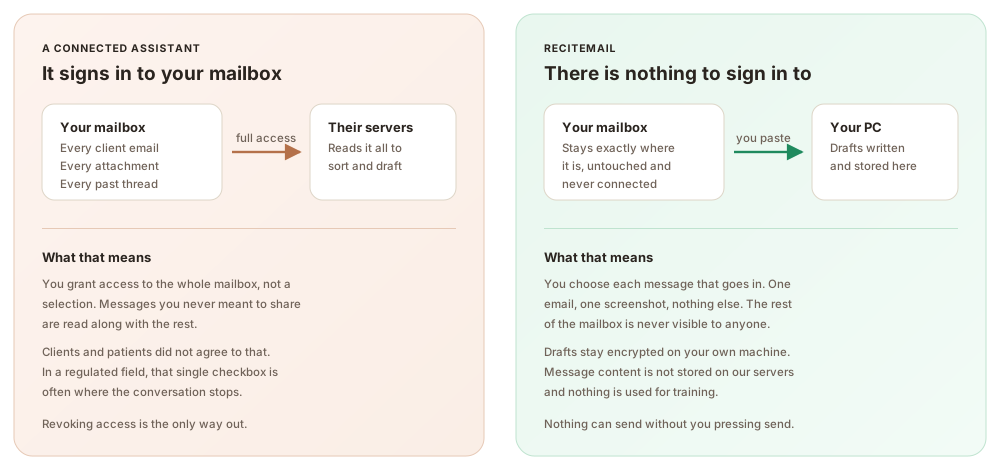
Side by side
ReciteMail and Grammarly compared
Grammarly wins several rows outright. The table marks them the same way as ours.
| Grammarly | ReciteMail | |
|---|---|---|
| What it is | A writing checker and rewriter | A reply drafting tool |
| Price | Free tier. Pro $12 a month billed yearly, $30 monthly | €29.99 a month or €299 a year |
| Fixes grammar as you type | Yes, everywhere you write | No, it writes the draft instead |
| Writes the whole reply from a brief | Rewrites and prompts, you compose first | Yes, that is the point |
| Learns your voice | Adjusts tone per message | Learns from sent emails you import |
| Works beyond email | Documents, chat, browser, everywhere | No, it is for email replies |
| Dictate the reply | Not the core flow | Yes, say one line and read the draft |
| Reads the incoming email for you | No, it sees what you write | Yes, snip it off the screen |
| Browser and app access | Extension watches your typing | None, nothing is connected |
| Platforms | Windows, Mac, mobile, browser | Windows 10 and 11 only |
← Swipe → the table to see every column
Grammarly pricing checked on 26 August 2026 from publicly listed rates. The free tier remains generous. Pro is $12 a month billed annually or $30 month to month, with the former separate Business plan folded into Pro for teams. Grammarly's parent company also acquired Superhuman during 2025, with deeper email features positioned there.
Three practical differences
What you actually notice day to day
Correcting against composing
The deepest difference is where each tool enters the job. Grammarly assumes you have written something and makes it better, which is perfect for documents, posts and the emails you actively want to craft. ReciteMail assumes the real cost is composing the reply at all: reading the customer's message, deciding what to say and typing it out, forty times a day. It collapses that to a snip and a spoken sentence. Plenty of people run both, Grammarly for everything they write by hand and ReciteMail for the repetitive customer replies they would rather not write by hand at all.
Everywhere against one place
Grammarly's strength is ubiquity. The same checker follows you into Word, the browser, chat tools and email, which is why it has hundreds of millions of users. ReciteMail deliberately lives in one place, a desktop window beside your inbox, because its job is narrow: customer email replies, done fast, in your voice. If you want one assistant across all your writing, that is Grammarly. If the pile of replies is the specific problem, breadth does not help with it.
Your tone per message against your voice learned once
Grammarly adjusts tone message by message: friendlier here, more confident there, applied to sentences you typed. ReciteMail builds a standing picture of how you write from the sent emails you import, then every draft comes out sounding like you by default, greeting to sign off. One is a dial you turn each time. The other is a voice it already knows. For a business where consistency across hundreds of replies matters, the learned voice is the difference between edits and none.
Being straight with you
When Grammarly is the better choice
Pick Grammarly if your own writing is the product. If you write documents, proposals, posts and carefully composed emails all day, Grammarly makes every one of them better for very little money. Its free tier is the best value in writing software. It is also the right choice if you need Mac or mobile coverage today. Pick ReciteMail when the problem is not the quality of your writing but the volume of replies: the same forty customer emails every day that each need a personal answer in your tone. And if the honest answer is both problems, the two tools do not overlap and run happily side by side.
Beyond one inbox
Who chooses the no-access option
Stores, accountants, clinics, solicitors, compliance teams, property managers, agencies and trades. Anywhere handing an app your whole mailbox is the sticking point, drafting beside it is the answer.
Questions
Common questions
What is the difference between Grammarly and ReciteMail?
Grammarly improves writing you have already typed: grammar, tone and rewrites, everywhere you write. ReciteMail writes the customer reply for you from a one line brief, in a voice learned from your own sent emails. One is a checker, the other is a drafter. They solve different problems and many people use both.
Can Grammarly write a whole email reply for you?
Partly. Grammarly's paid tiers can rewrite sentences and generate text from prompts. The flow still centres on you composing in your inbox while it assists. ReciteMail inverts that: you hand it the customer's email and one line of intent, then it produces the complete reply, subject line to sign off, ready to paste. If you rarely want to type the reply at all, that inversion is the entire difference.
Is ReciteMail a replacement for Grammarly?
Only for customer email replies. Grammarly covers documents, browsers, chat and everything else you type, which ReciteMail does not touch. ReciteMail covers the composing of replies, which Grammarly only assists with. A small business that writes reports and answers customers is well served by both. There is no conflict running the two together.
Which is better for privacy, Grammarly or ReciteMail?
They have different shapes. Grammarly's extension necessarily processes text you type across your apps. The company documents its handling of that data. ReciteMail's design avoids the question: nothing is connected, nothing watches your typing and your imported mail stays encrypted on your machine. Only the single message being answered is sent out to draft the reply. For businesses uneasy about a checker seeing everything typed, that is the structural difference.
How do the prices compare?
Grammarly has a genuinely useful free tier, with Pro at $12 a month billed yearly or $30 month to month. ReciteMail has no free tier beyond the 7 day trial and costs 29.99 euro a month or 299 a year, with unlimited drafting under fair use. If budget is the deciding factor and light checking is enough, Grammarly free wins. If an hour a day of reply writing disappears, ReciteMail's fee pays for itself in the first week.
Does ReciteMail check grammar like Grammarly does?
It does not underline mistakes in text you type. Instead the drafts it produces are already clean, professional and in your tone, meaning there is less to check in the first place. You read every draft before sending and can revise any line with an instruction like make it firmer. For writing outside customer replies, a checker like Grammarly remains the right tool.
Stop typing the reply at all
Import a few sent emails so it learns how you write, then answer this week's customer pile from one line briefs. Free for 7 days, no credit card.
Start your free trial€29.99 a month or €299 a year after the free week. Windows 10 and 11. Reads and replies in 60+ languages.