Comparison
ReciteMail vs Gemini in Gmail
Gemini is built into Gmail and included with most Google Workspace plans. If you are already paying for Workspace you have it right now. ReciteMail is a separate Windows app that drafts replies in your own voice beside whatever mail you use. It never connects to an account.

In one paragraph
The short answer
If your business runs on Google Workspace Business Standard or above you already have Gemini in Gmail, it costs nothing extra today and you should try it before you buy anything. It summarises long threads, drafts a reply from a short prompt and sits in a side panel next to your mail. Two things it will not do. It only works inside Gmail. That is no help in Outlook, in a desktop client or on an email a customer pasted into a form. And it reads your mailbox to work at all. ReciteMail makes the opposite trade. It connects to nothing, it sits beside whatever mail app you already use and it learns your actual writing from sent mail you chose to import. 29.99 euro a month, flat.
Gemini in Gmail
Google's assistant, inside Gmail. A side panel in Gmail that summarises threads, answers questions about your mail and drafts replies from a prompt. Included with Business Standard and above rather than sold separately. It works across Docs, Sheets and Meet as well.
ReciteMail
A drafting tool that sits beside any inbox. Nothing connects and nothing migrates. You paste an email in or snip it off the screen, read the draft it wrote in your voice and send it from whatever mail app you already use, Gmail included.
The structural difference
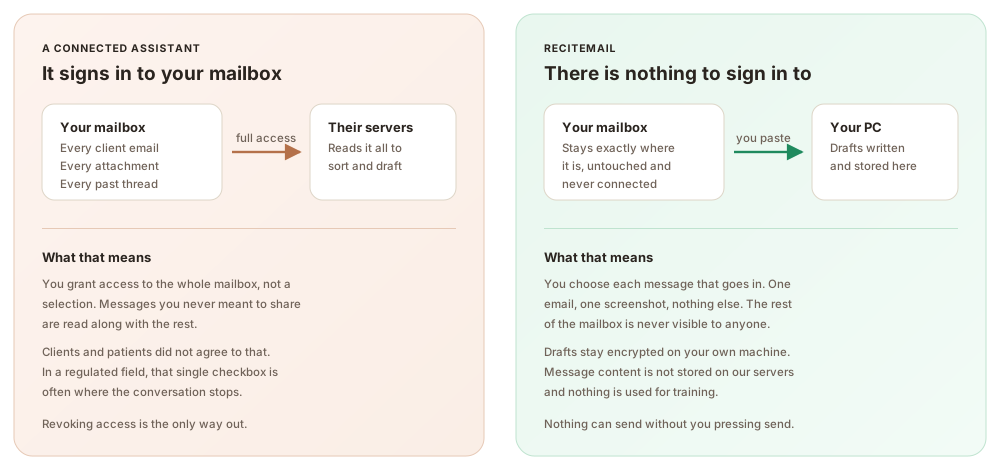
What each one is allowed to see
Gemini works because Google already holds your mail. That is not a criticism, it is the arrangement you signed up for when you chose Workspace. It does mean the question is not whether to trust one more vendor but how much of your mailbox any assistant should touch.
Side by side
ReciteMail and Gemini in Gmail compared
Gemini wins several rows outright. The table marks them the same way as ours.
| Gemini in Gmail | ReciteMail | |
|---|---|---|
| What it is | An assistant built into Gmail | A separate drafting app for Windows |
| Price | Included with Workspace: about $7 Starter, $14 Standard, $22 Plus per user a month | €29.99 a month or €299 a year, flat |
| Really free? | No. Google folded Gemini into the plans in March 2025 and raised base prices by 17 to 22 per cent to pay for it | Priced on its own, nothing bundled into it |
| Where it works | Gmail, plus Docs, Sheets, Slides and Meet | Beside any mail app on Windows, including Gmail and Outlook |
| Works in Outlook | No | Yes, it does not care which client you use |
| Mailbox connection | Yes, it is inside your mailbox | None, there is nothing to connect |
| Learns how you write | Writes in a competent general register | Learns from sent emails you import |
| Setup | None at all, it is already there | Install, then import some sent mail |
| Dictate the reply | Not in the Gmail side panel | Yes, say one line and read the draft |
| Other languages | Yes, broad language support | Reads and drafts in 60+ languages |
| Platforms | Anywhere Gmail runs, including phones | Windows 10 and 11 only |
← Swipe → the table to see every column
Gemini and Workspace pricing checked on 3 August 2026 from Google's published plan rates. Gemini has not been sold separately since March 2025. An AI Expanded Access add-on launched in February 2026 with no published list price. Resellers quote it at roughly $20 per user a month.
Three practical differences
What you actually notice day to day
Bundled is not the same as free
Gemini feels free because no line on the invoice says Gemini. What actually happened in March 2025 is that Google retired the standalone add-on and lifted Workspace base prices by 17 to 22 per cent to absorb the cost. You are paying for it, spread across every seat, whether or not anyone on the team uses it. ReciteMail is a separate 29.99 euro that you can cancel on its own.
One tab against any window
Gemini lives in Gmail. If your business runs on Outlook it is simply not available. Even on Gmail it cannot help with an enquiry that arrived through a web form, a marketplace message or a customer service portal. ReciteMail takes whatever text you put in front of it. Snip it off the screen from any application, paste it or dictate a line about it. The draft comes back the same way.
Competent against yours
Gemini writes clean, correct, slightly formal email. It has never read a single reply you have sent. It cannot know that you open with the person's first name, explain a delay without apologising twice or sign off the way you do. ReciteMail learns exactly that from sent mail you import. The difference shows up most on the fortieth reply of the day, which is the one that usually reads like a form letter.
Being straight with you
When Gemini in Gmail is the better choice
Pick Gemini if you live in Gmail and want nothing to install. There is a genuinely strong case for it. You are already paying, there is no setup, it works on your phone and it stretches across Docs and Meet as well as Gmail. If your whole working day happens inside Google and you want a summary of a long thread or a decent first draft, open the side panel and use it. It costs you nothing more today. ReciteMail earns its place elsewhere. On Outlook. On the enquiry that arrived through a form rather than an inbox. On drafts that need to sound like you rather than like a well-mannered stranger. And on the day you decide no assistant should hold the keys to the whole mailbox.
Beyond one inbox
Who chooses the no-access option
Stores, accountants, clinics, solicitors, compliance teams, property managers, agencies and trades. Anywhere handing an app your whole mailbox is the sticking point, drafting beside it is the answer.
Questions
Common questions
Is Gemini in Gmail free?
Not really. Google stopped selling Gemini as a separate add-on in March 2025 and folded it into Workspace plans, raising base prices by roughly 17 to 22 per cent to cover it. So there is no Gemini line on your invoice and you are still paying for it on every seat. Business Starter at about $7 a user only gets the Gmail side panel. Full access starts at Business Standard, around $14.
Can Gemini in Gmail write emails in my own style?
It writes clear, competent, fairly formal email. It has not read the replies you have already sent. It does not know your greetings, your way of delivering bad news or your sign-off. ReciteMail learns those from sent mail you import yourself, which is why its drafts sound less like a template and more like you on a good day.
Does Gemini work in Outlook?
No. Gemini in Gmail is part of Google Workspace and stops at the Gmail window. Microsoft's equivalent for Outlook is Copilot, which is a separate purchase. ReciteMail works beside whichever one you use because it never connects to either, you simply give it the message you want answered.
Which is more private, Gemini or ReciteMail?
Google already holds your mail if you use Gmail. Gemini is not asking for anything new. The honest difference is scope: Gemini reads your mailbox to work, while ReciteMail only ever sees the single message you hand it and keeps everything you import in an encrypted database on your own PC. Neither is used to train a model.
Can I use both?
Plenty of people would. Use Gemini for summarising long threads and searching your mail, which it does well and ReciteMail does not do at all. Use ReciteMail for the replies that need to sound like you and for anything arriving outside Gmail. They do not conflict because ReciteMail has nothing plugged into your account.
What does ReciteMail cost?
29.99 euro a month or 299 euro a year, unlimited drafting under fair use. One account covers two computers. The trial runs 7 days with no card needed.
Replies in your voice, in any inbox
Keep Gmail, keep Outlook, keep both. Import a few sent emails so it learns how you write, then answer this week's replies in minutes. Free for 7 days, no credit card and nothing to connect.
Start your free trial€29.99 a month or €299 a year after the free week. Windows 10 and 11. Reads and replies in 60+ languages.