For trades and field services
The emails answered from the bench, not at seven in the evening
A trade's inbox fills up while the actual work is happening. Quotes to send, proofs to chase, job updates to write, all of it waiting until the tools are down. ReciteMail lets you say the reply out loud and drafts it properly in your own voice. It never connects to your email and nothing sends without you.

The daily reality
The emails that pile up while you work
None of them are hard to write. The problem is that they all arrive during the working day and every hour spent typing is an hour off the job.
The quote follow-up
You priced the job a week ago and heard nothing. The follow-up has to nudge without begging, because the same customer might have three more jobs behind this one. ReciteMail drafts the check-in warm and brief in your voice. Following up takes one line instead of twenty minutes at the kitchen table.
The job update
Materials delayed, an extra day needed, a snag found behind the plaster. Customers forgive almost anything except silence. Say what happened in one sentence and the update goes out calm and clear, with the new dates stated plainly and nothing over-promised.
The proof and approval chase
Signage, print and fabrication live on sign-offs. The third chase for an approval is the awkward one, because the deadline is now theirs to miss. ReciteMail keeps the chase polite and firm, states what happens to the schedule if today passes and still sounds like you rather than a contract.
Why the design matters here
Why no mailbox access matters on a job site
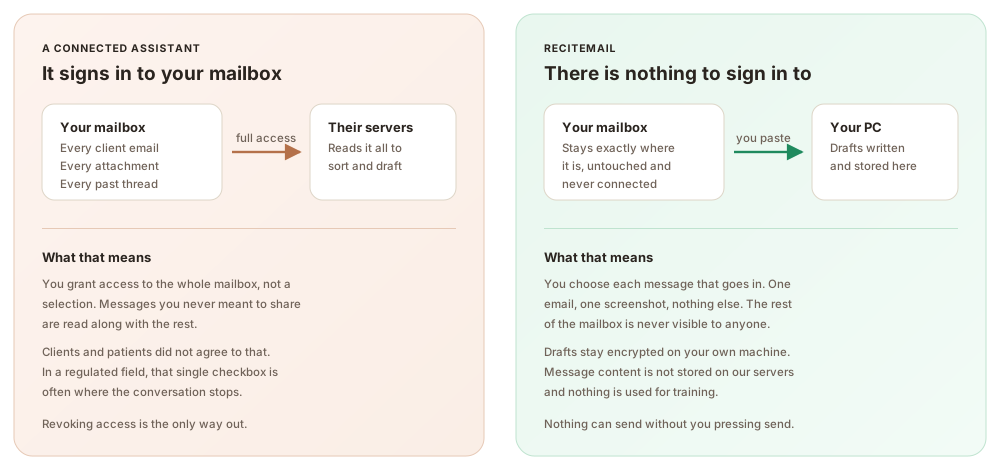
Connected email assistants want to read the whole mailbox. Yours holds customer addresses, alarm codes in old threads, pricing you would not show a competitor and every quote you ever sent. ReciteMail is import-only: you bring in one email at a time and the rest stays where it is. There is no account connection to set up in a portal and nothing for anyone else to get into.
Your hands stay on the work. The floating quick bar snips an email straight off the screen and takes the reply by voice. Say the answer between jobs and read the finished draft when you are back at the van. Nothing sends until you press send yourself.
The same three steps every time
From their email to your reply in under a minute
1. Bring in one message
Snip the customer's email off the screen or paste it in. That single message is the only thing the system ever sees, never the mailbox around it.
2. Read the draft
It arrives in your voice, learned from emails you chose to import, with your sign-off attached and the prices exactly as you dictated them.
3. Send it yourself
Copy into your own email client and press send. Nothing can send on its own, because nothing is connected to anything.
Questions
Common questions
Does ReciteMail connect to my work email?
No, never. There is no sign-in to Outlook, Gmail or anything else and no permission to grant. You bring in one message at a time by pasting it or snipping it from the screen. The rest of your mailbox stays invisible to the tool by design.
Can I really answer emails by voice?
Yes. Tap the mic on the floating quick bar, say something like tell him the job runs one extra day and apologise for the wait. A full draft appears written in your voice. You read it before anything goes anywhere. Dictating a one line brief between jobs beats typing a paragraph at seven in the evening.
Will the drafts sound like me or like a call centre?
Like you. During setup you import emails you have already sent and it learns how you greet people, how you explain a delay and how you sign off. Customers hired a tradesperson rather than a corporation. The drafts keep it that way.
What happens to my prices and job details?
They stay on your machine. Everything you import lives in an encrypted database on your own PC. When you draft a reply, only that single message plus your instruction travels over a secure connection. It is not stored on our servers and never used for training.
I am not good with computers. How hard is the setup?
If you can attach a file to an email you can set it up. Install it on a Windows PC, import a file of your sent emails using the built-in guide and you are drafting the same afternoon. A short tour walks you through everything the first time.
What does it cost?
29.99 euro a month or 299 euro a year, unlimited drafting under fair use. One account works on two computers. The office machine and the laptop in the van are both covered. The trial is 7 days with no card needed.
Try it on this week's quote chasing
Import a handful of sent emails so it learns how you write, then answer the week's quotes and updates in minutes. Free for 7 days, no credit card and nothing to connect.
Start your free trial€29.99 a month or €299 a year after the free week. Windows 10 and 11. Reads and replies in 60+ languages.