For solicitors and small firms
Client correspondence in your voice, privilege intact
Client updates, undertakings chased, the third polite letter about the same unpaid invoice. A solicitor's inbox is privileged by its nature, which makes every connected email tool a non-starter. ReciteMail drafts beside your inbox and never gains access to it.

The daily reality
The letters that fill a fee earner's afternoon
Little of it is legally difficult. All of it needs precision, the right register and a clean record. It lands between the work that actually bills.
The client update that buys patience
Conveyancing that stalled on the other side, probate waiting on a grant, litigation moving at litigation speed. The update that says nothing new still has to be sent. It has to read like care rather than a form letter. Drafts arrive in your register with the file details exactly as you gave them.
The chase with a paper trail
Undertakings outstanding, replies overdue from the other side, an expert report promised for last Tuesday. Firm, dated, professional and safe to read back in front of anyone. The tone holds steady from first reminder to final notice.
The fee conversation
An invoice queried, an estimate exceeded for good reason, a retainer that needs topping up. The emails nobody enjoys writing are the ones that most reward a careful first draft you can sharpen rather than a blank page you avoid.
Why the design matters here
Why connected tools stop at the engagement letter
An assistant that sorts and drafts inside the mailbox must read the mailbox. A firm's mailbox is client confidence end to end. That single fact rules out the whole connected category for most solicitors. ReciteMail requires no such decision: it cannot see the inbox. Privilege never meets a third party.
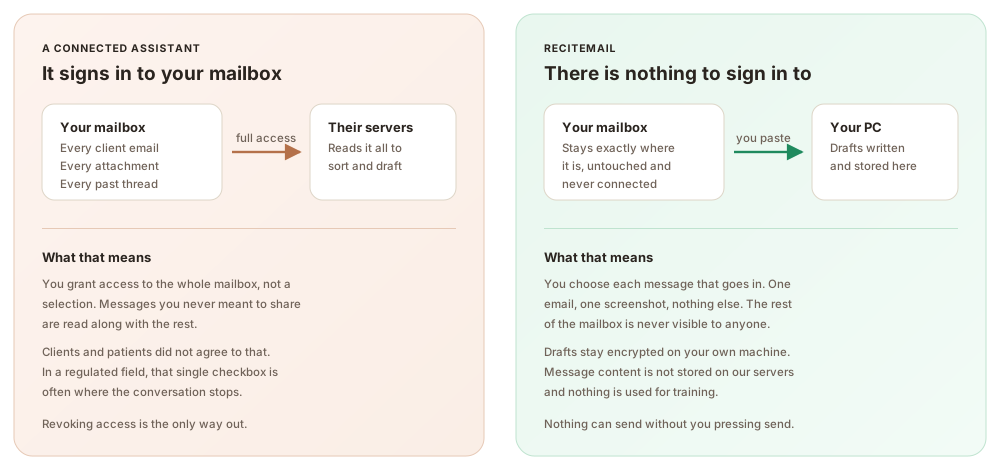
Nothing to disclose, nothing to revoke. No processor holds standing access to your correspondence. There is no software relationship to explain to a client and no access to unwind when an engagement ends. The single message you bring in is processed to draft your reply, never stored on our servers and never used for training.
The same three steps every time
From their email to your reply in under a minute
1. Bring in one message
Paste the letter or email in or snip it from the screen. That single message is the only thing the system ever sees.
2. Read the draft
It arrives in your register, learned from correspondence you chose to import, with your sign-off attached and every fact left exactly as you stated it.
3. Send it yourself
Copy into your own email client and press send. Nothing can send on its own, because nothing is connected to anything.
Questions
Common questions
Does ReciteMail have access to privileged correspondence?
No. It never connects to your mailbox or document system. It has no access to the file, the inbox or anything you did not explicitly bring in. You paste or snip one message at a time and the rest of your correspondence stays invisible to it by design.
Where does the text I bring in actually go?
Imported messages live in an encrypted database on your own machine. When you draft, only that single message plus your instructions travels over a secure connection to produce the reply. It is not stored on our servers and it is never used to train anything.
Does it draft legal advice?
No. It should not. ReciteMail drafts correspondence: updates, chasers, cover letters and fee emails, in your voice, from the facts you provide. The legal content is yours. It writes the letter around it. You review every word before sending from your own account.
Can drafts keep our house style?
Yes. It learns from letters you have already sent. Openings, sign-offs and register match the firm rather than a generic template. On the Teams plan, three or more fee earners share templates and one house voice on one invoice.
Can anything be sent without a person reviewing it?
Never. There is no send button because there is no mailbox connection. Every draft is read by the person whose name is on it, pasted into your own email and sent from your own account.
Try it on this week's client updates
Import a handful of sent letters so it learns your register, then draft the updates and chasers in minutes. You review every word before anything leaves the office. Free for 7 days, no credit card.
Start your free trial€29.99 a month or €299 a year after the free week. Windows 10 and 11. Reads and replies in 60+ languages.