For accountants and bookkeepers
Client emails in your voice, without handing over the inbox
An accountant's inbox is a ledger of other people's money: payroll queries, tax questions, statements and filings. ReciteMail drafts your replies in your own voice and never connects to any of it. You bring in one email at a time and nothing else is ever visible.

The daily reality
The emails that eat a practice's week
None of these are hard to write. The cost is that they arrive every day, they all need care and every one carries someone's financial details inside it.
The chasing email
Records for year end, a missing receipt, the same bank statement requested for the third time. Firm enough to get a response, warm enough to keep the client. ReciteMail drafts the polite chase in your voice and keeps the follow-up tone consistent from the first nudge to the last.
The deadline reminder
Filing dates, payment deadlines, documents needed by Friday. The same message to forty clients, each one needing their own name, their own numbers and your own way of saying it. Templates adapt per client instead of reading like a mail merge.
The awkward explanation
A bill higher than expected, a penalty that was avoidable, a query about scope. The replies that take twenty minutes because every word matters. ReciteMail gives you a careful first draft to shape rather than a blank page at six in the evening.
Why the design matters here
Why no mailbox access is the whole point here
A connected email assistant has to read the inbox to work. An accountant's inbox holds every client's financial life. Granting a third party standing access to that is a conversation nobody wants to have at engagement time. ReciteMail removes the conversation: there is no connection, no standing access and nothing to disclose.
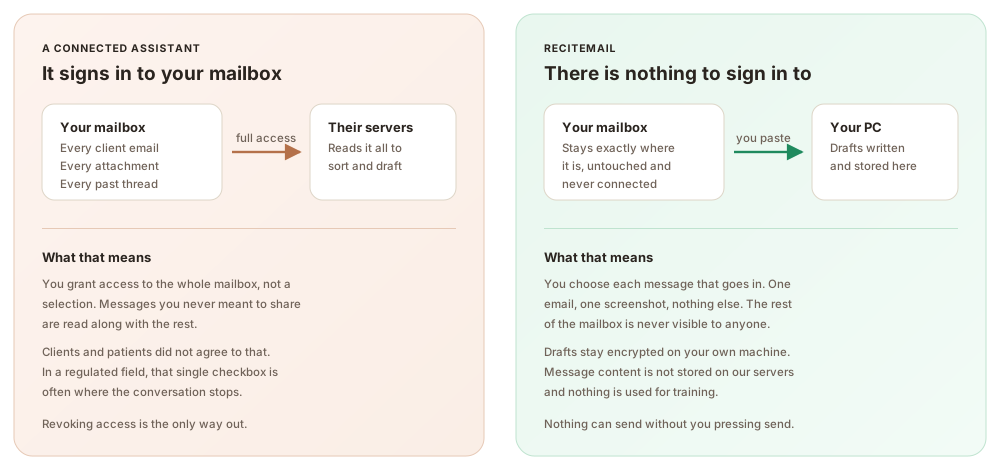
The client never has to be asked. Because no tool ever gains access to your mailbox, there is no third party access to explain in an engagement letter and nothing to revoke later. The only content the system ever sees is the single message you chose to bring in. Your drafts live encrypted on your own machine.
The same three steps every time
From their email to your reply in under a minute
1. Bring in one message
Paste the client's email in or snip it from your screen. That single message is the only thing the system ever sees, never the mailbox around it.
2. Read the draft
It arrives in your voice, learned from emails you chose to import, with your sign-off attached and the numbers left exactly as you typed them.
3. Send it yourself
Copy into your own email client and press send. Nothing can send on its own, because nothing is connected to anything.
Questions
Common questions
Does ReciteMail connect to my work mailbox?
No, never. There is no sign-in to Outlook, Gmail or any practice system and no permission to grant. You bring in one message at a time by pasting it or snipping it from your screen. The rest of your mailbox stays invisible to the tool by design.
Where do client emails go when I use it?
The messages you import live in an encrypted database on your own computer. When you draft a reply, only that single message plus your instructions travels over a secure connection. It is not stored on our servers and it is never used for training. Nothing is uploaded in bulk because bulk upload does not exist in the product.
Will drafts actually sound like me rather than a chatbot?
That is the core of the product. During setup you import a handful of emails you have already sent and it learns how you greet clients, how you explain things and how you close. Clients have read plenty of AI-sounding email by now. The drafts here read like the person they chose to trust with their accounts.
Can my practice manager and I share it?
Yes. One account works on two computers at the same time. The Teams plan covers three or more people with shared templates and one house voice on one invoice. Each person still reads and sends their own replies.
What does it cost during busy season when volume spikes?
The same as any other month. ReciteMail is 29.99 euro a month or 299 euro a year, unlimited under fair use. January costs the same as June, however many chasing emails you send.
Try it on this week's client emails
Import a handful of sent emails so it learns how you write, then draft the week's chases and reminders in minutes. Free for 7 days, no credit card and nothing to connect.
Start your free trial€29.99 a month or €299 a year after the free week. Windows 10 and 11. Reads and replies in 60+ languages.