Notion Mail Is Shutting Down: What to Do Before 22 September
Published 15 August 2026 · 6 minute read · The ReciteMail Blog
On 25 June 2026 Notion announced it is retiring Notion Mail. The app goes offline on 22 September 2026, less than a year and a half after it launched. Your email itself is safe, because Notion Mail was a window onto Gmail rather than a mail host. But drafts and scheduled sends need exporting by hand, a replacement needs choosing and for anyone who came to Notion Mail from Skiff this is the second shutdown notice in two and a half years. Here is the calm version of what to do.
What is actually happening
- The dates. Announced 25 June 2026. Service ends 22 September 2026. Notion Mail launched in April 2025, which means the whole product lived about seventeen months.
- The stated reason. Notion says more than half of Notion Mail users had stopped opening the app, letting agents handle their email instead. The company is dropping the traditional inbox interface to focus on agent driven email.
- Your messages are fine. Notion Mail connected to Gmail. Every email stays in your Google account exactly as it was. Nothing about the shutdown touches the mail itself.
- Two things are not fine on their own: drafts written inside Notion Mail and scheduled sends queued there. Those live in the app and must be copied out manually before 22 September.
The checklist
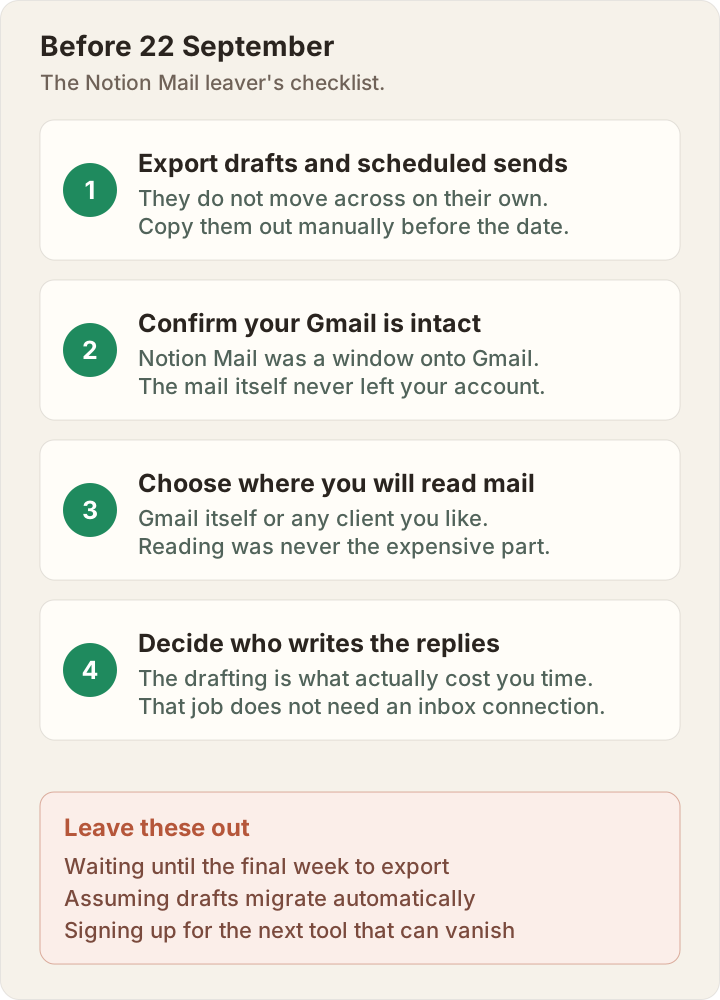
Do the export this week rather than the week of the deadline. Shutdown weeks are when support queues are longest and half-remembered drafts get lost. The rest of the checklist has no urgency at all, which is worth knowing: your reading experience can fall back to plain Gmail tomorrow and nothing breaks.

If this feels familiar: the Skiff story
For a lot of Notion Mail users this is not their first migration email. Notion acquired Skiff, the encrypted email and docs platform, on 9 February 2024 and sunset it over the following months. The Skiff team joined Notion and its email ambitions resurfaced as Notion Mail in April 2025. Users who followed that path have now watched two email products retire underneath them in about two and a half years, through no fault of their own either time.
That is not bad luck. It is the normal life cycle of cloud email tools, where being acquired or refocused is a routine corporate event and the migration work always lands on the user. The practical lesson is not "pick a better company." It is to notice which parts of your workflow have to live in someone's cloud and which parts never did.
Choosing what replaces it
The reading half: any client you like
Because Notion Mail was Gmail underneath, the reading half of the decision is easy and low stakes. Gmail's own interface is the zero-effort landing spot. Superhuman, Shortwave and Spark are the usual upgrades if you want speed or opinionated design and every one of them plugs into the same Google account you already have. To be plain about it: ReciteMail is not an email client and cannot be this half of the answer. If a full inbox app is what you are after, one of those four is your list.
The writing half: the part that actually cost you time
Be honest about what Notion Mail actually saved you, though. Reading mail was never the expensive part of email. Writing the replies was: the quotes, the follow-ups, the carefully worded no to a customer. That job never needed an inbox connection and it is the job ReciteMail does. It runs on your Windows PC, learns how you write from emails you have already sent and turns a one-line note like "cannot do Friday, offer Tuesday, keep it warm" into a full reply in your voice. You paste it into Gmail or whichever client you land on and press send yourself.
The structural difference matters after a year like this one: ReciteMail never connects to your mailbox. Your imported mail lives in an encrypted database on your own machine, nothing sits on our servers and there is no integration to unwind when a company changes strategy. Whatever client you pick for reading, the writing half stops being migratable because it stops being cloud furniture. The longer version of that argument is in email automation vs writing the reply yourself.
The shutdown-proof test. Before adopting the next tool, ask one question: what happens to my workflow when this product is retired? If the answer involves exporting, migrating and re-learning, you are renting. If the answer is "nothing, it is on my machine," you own it. ReciteMail is built to pass that test. The wider tool landscape is mapped in our field guide to email drafting tools.
Common questions
When exactly does Notion Mail shut down?
22 September 2026. Notion announced the decision on 25 June 2026, saying it would retire the app to focus on agent driven email. The app existed for under a year and a half, from its April 2025 launch to the shutdown date.
Will I lose my emails when Notion Mail closes?
No. Notion Mail was a client that connected to Gmail rather than a mail host, which means every message stays in your Google account untouched. The exceptions are drafts and scheduled sends created inside Notion Mail itself: those live in the app and must be exported manually before 22 September or they are gone.
What is the best Notion Mail alternative?
Split the question in two. For reading and managing mail, your Gmail works in any client: Gmail itself, Superhuman, Shortwave and Spark are the common landing spots. For the drafting that Notion Mail's assistant helped with, that job does not need an inbox connection at all: ReciteMail drafts replies in your own voice on your own PC and works beside whichever client you choose.
Why is Notion shutting down Notion Mail?
Notion says user behaviour moved on: a large share of Notion Mail users stopped opening the app and let agents handle their email instead. The company is therefore retiring the traditional inbox interface and focusing on agent driven email. It is a strategy decision rather than a data loss event.
Make this your last migration
ReciteMail drafts replies in your own voice, learned from mail you have already sent. It runs on your PC, never connects to your inbox and works beside Gmail or any client you move to next. Free for 7 days, no card needed.
Start your free trial