ReciteMail vs ChatGPT for Email Replies
Published 22 July 2026 · 7 minute read · The ReciteMail Blog
If you use AI to answer email today, odds are the routine looks like this. Open ChatGPT, paste the message in, type a quick instruction, copy the result back out. It is a perfectly reasonable default and ChatGPT is a genuinely capable tool. This page is not going to pretend otherwise. But a general chat window and a tool built only for email replies solve the same problem very differently, so here is the comparison spelled out, including the places where ChatGPT is still the better choice.
What ChatGPT does well
Credit first. ChatGPT is excellent at the one off hard email, the kind you would have stared at for twenty minutes. It brainstorms angles you had not considered. It rewrites a clumsy paragraph in seconds. It also does everything that is not email, from summarising a contract to planning a trip, which no email tool will ever match. There is a free tier, so trying it costs nothing.
If you write four emails a week, that is honestly the whole answer. Use ChatGPT. The comparison below only starts to matter when replies are a daily part of how you earn money.
The copy and paste loop
The real cost of a chat tool for email is not quality. It is the loop you run for every single reply.
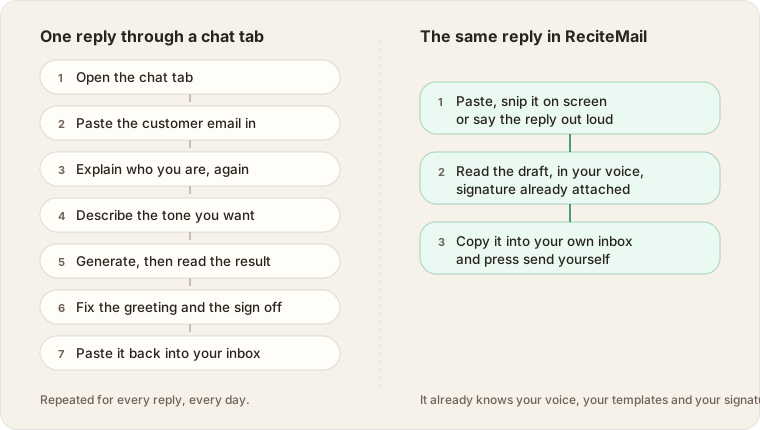
None of those steps is hard. The cost is repetition. A chat session starts as a stranger, so you introduce yourself again, describe the tone again, fix the greeting again, paste your sign off again. ChatGPT's memory can hold facts you have told it, but it was not built to carry your signature, your templates and your customer history in the shape an inbox needs. Twenty replies a day means running that loop twenty times.
ReciteMail collapses the loop because the context never leaves. It already learned your voice from your own sent emails. Your signature is attached. Your templates are saved once and adapted to each new message. You paste the email in, snip it from your screen or say the reply out loud, then read the draft and send it from your own inbox.
Sounding like you instead of a chatbot
Your customers have read thousands of AI generated emails by now. They recognise the cadence, the slightly too cheerful openings, the tidy little summary at the end. A reply that reads like a chatbot quietly tells the customer that nobody wrote to them.
Getting ChatGPT out of that voice is possible, but you are doing it by hand, one prompt at a time, every session. ReciteMail does it once. During setup you import a handful of emails you have already sent. It studies how you greet people, how direct you are, how you close, then drafts every reply in that voice. The difference shows up most on the replies you send every day, which is exactly where the chatbot voice does the most damage.
Where your email ends up
This is the part most people never think about. Every customer email you paste into a chat tool becomes part of a conversation history stored in a cloud account. On the consumer ChatGPT plans, conversations can also be used to train future models unless you switch that off yourself. As of publication the setting is called Improve the model for everyone and it is on by default for free and Plus personal accounts, while business plans are excluded. None of this is hidden. It is simply not what you are thinking about while pasting a customer's complaint into a browser tab.
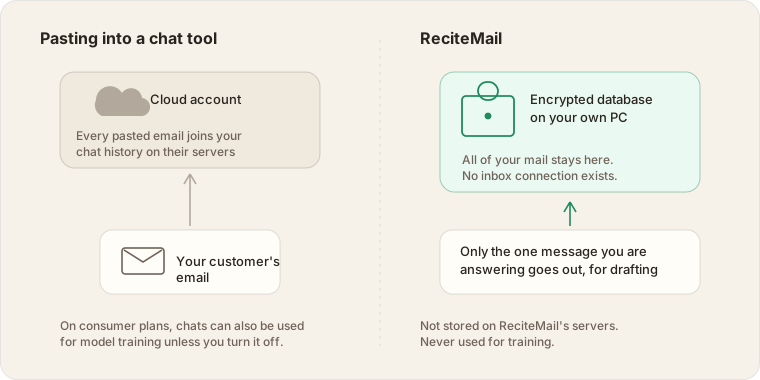
ReciteMail was designed in the opposite direction. It never connects to your inbox, so a bulk upload of your mail is impossible by design. Everything you import lives in an encrypted database on your own computer. When you draft, only the one message you are answering plus your instructions travels over a secure connection. It is not stored on our servers and it is never used for training. The privacy policy says exactly this because the architecture makes it true.
Side by side
| For email replies | ChatGPT | ReciteMail |
|---|---|---|
| Built for | Everything | Email replies only |
| Your voice | Described by hand each session | Learned from your own sent emails |
| Getting an email in | Copy and paste | Paste, snip it on screen or dictate |
| Greeting and signature | Fixed by hand each time | Attached automatically |
| Templates | Re prompted each time | Saved once, adapted per message |
| Languages | Yes, via prompts | Read, reply and translate in 60+ with one click |
| Where your mail lives | Chat history in a cloud account | Encrypted on your own PC |
| Training on your content | On by default for consumer plans | Never |
| Inbox access | None | None, ever, by design |
| Can it send email | No | No. It cannot. |
| Platform | Everywhere | Windows 10 and 11 |
| Price | Free tier, Plus at $20 a month | €29.99 a month or €299 a year, 7 day free trial |
The price question, honestly
ChatGPT has a free tier. ReciteMail does not, beyond the trial week. If price is the deciding factor, ChatGPT wins that row and it would be silly to argue.
The arithmetic that changes minds is time. If a reply through the chat loop takes four minutes and the same reply through a purpose built flow takes under one, then at twenty replies a day you are buying back roughly an hour a day. Whether an hour of your day is worth a euro is a question you can answer without a calculator. The free week exists so you can measure it on your own inbox rather than take our word for it.
When ChatGPT is the better choice
- You write a handful of emails a week rather than dozens a day.
- You want one tool for everything, not a specialist.
- You are on a Mac or a phone. ReciteMail is Windows only today.
- The budget is zero. A free tier beats any subscription.
When ReciteMail fits better
- Customer replies are a daily, repetitive part of your work.
- The business needs one consistent voice, whether that is just you or a whole support team.
- Customer emails are confidential enough that chat history in a cloud account feels wrong.
- You are on Windows and you want drafts appearing next to your inbox, not in another tab.
If most of your repeat replies already live in saved templates, our guide on building a reply library pairs well with either tool. And if what you actually want is email that answers itself, read why we deliberately did not build automation first.
Common questions
Is ReciteMail just a ChatGPT wrapper?
No. ReciteMail is a Windows desktop application with its own drafting pipeline. It is not built on ChatGPT. The language model is one part of a larger system that includes your imported writing voice, your templates, per audience phrasing rules and a capture flow built for email. The model writes sentences. The product is everything around them.
Can I use ReciteMail and ChatGPT together?
Plenty of people do. ChatGPT stays useful for one off hard emails, brainstorming and everything that is not email. ReciteMail handles the daily replies. Run them side by side during the free trial and keep whichever wins each job.
Does ReciteMail send emails for me?
No. It cannot. ReciteMail never connects to your inbox, so there is nothing for it to send from. You copy the finished draft into your own email client with your formatting and signature intact and you press send yourself.
Does ReciteMail work offline?
Your mail, templates and settings live in an encrypted database on your own computer and stay available offline. Writing a new draft needs an internet connection, the same as any chat tool.
Measure it on your own inbox
Run ReciteMail next to ChatGPT for a week and keep whichever answers your email faster. Free for 7 days, no credit card and no mailbox connection.
Start your free trial